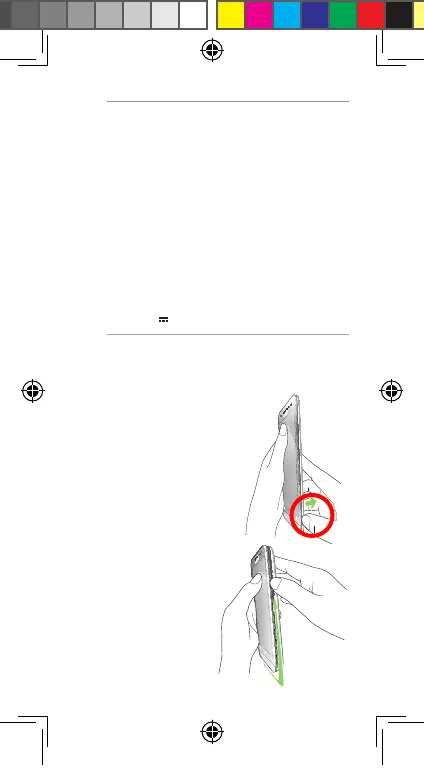
1. Locate the groove on the
bottom-right corner of your
ASUS Phone.
Installing a micro SIM card
To install a micro SIM card:
NOTES:
• Useonlythepoweradapterthatcamewith
your device. Using a different power adapter
may damage your device.
• UsingthebundledpoweradapterandASUS
Phone signal cable to connect your ASUS
Phone to a power outlet is the best way to
charge your ASUS Phone.
• UsetheASUS5Wpoweradapterand
ASUS USB cable to get the best fast-charge
experience when your ASUS Phone is in
sleep mode.
• Theinputvoltagerangebetweenthewall
outlet and this adapter is AC 100V - 240V.
TheoutputvoltageofthemicroUSBcableis
+5.2V 1A, 5W.
2. Topulltherear
cover off, pry the
cover loose from
the groove going
upward, then
from the groove
downward in a
leftward direction.
U11519-1_ZB552KL_UM_Booklet.indb 6 2016/7/14 13:34:02


 To Next Page