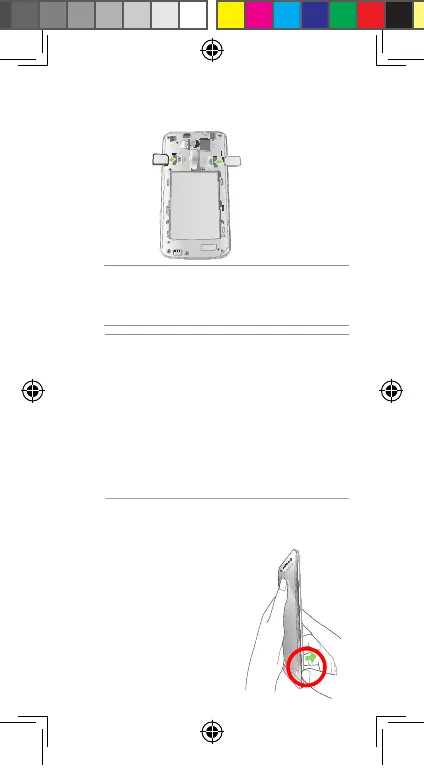
1. Locate the groove on the
bottom-right corner of your
ASUS Phone.
Installing a microSD card
To install a microSD card:
Micro SIM card 1
Micro SIM card 2
CAUTION!
• Donotusesharptoolsorsolventonyour
device to avoid scratches on it.
• UseonlyastandardmicroSIMcardonyour
ASUS Phone. A nano to micro SIM adapter
oratrimmedSIMcardmaynotproperlyt
into and may not be detected by your ASUS
Phone.
• DO NOT install an empty nano to micro
SIM adapter into the micro SIM card slot to
avoid irreversible damage.
3. Insert the micro SIM card into one of the micro
SIM card slots.
IMPORTANT: Both micro SIM card slots support
3GWCDMAand4GLTEnetworkbands.Butonly
one micro SIM card can connect to 3G WCDMA /
4GLTEserviceatatime.
U11519-1_ZB552KL_UM_Booklet.indb 7 2016/7/14 13:34:02


 To Next Page