31ASUS Xonar DG
6.3 Mixer/Volume
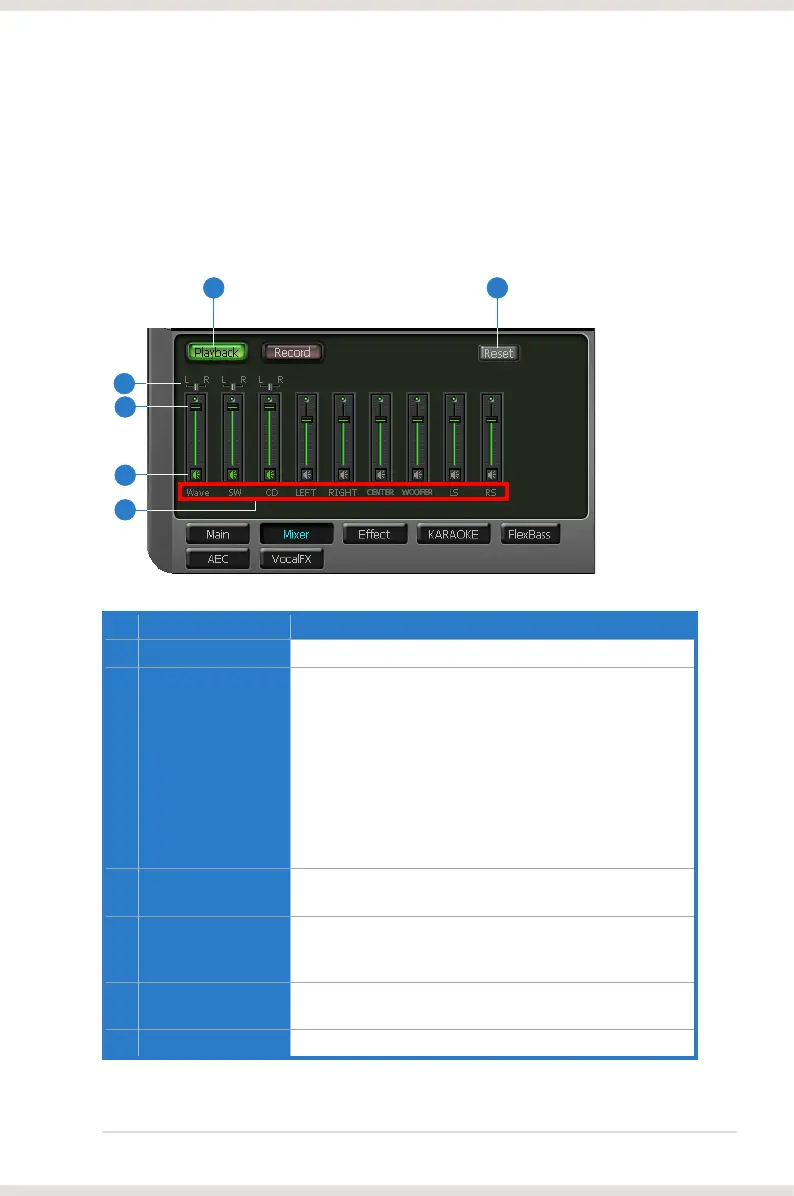
The mixer page is designed to control the volume for playback and recording
on the Xonar DG. In addition, the Xonar DG also provides a high-quality digital
monitoring function for hearing the recorded audio from the speakers.
6.3.1 Playback Volume
No Item Description
1 Playback volume tab
Click this button to show the playback volume page.
2 Source / path name
This shows the source name for each volume control slider,
including:
- CD: CD-ROM digital playback (CD-DA) volume control
- LEFT, RIGHT…: the volume control for each speaker/
channel
NOTE: Windows
®
and CD-In volume controls.
3 Mute button
again to restore the audio output.
4 Volume slider
increase the volume. The tool-tip reveals the percentage
number from 1 to 100 in terms of the full scale level.
5 Left/Right balance
and right channels. (On Windows XP only)
6 Reset
Reset all volume controls to the default settings.
61
2
4
3
5



 To Next Page