52
Chapter 6: Your precious moments
Photo Locations
To enable the location tagging feature, refer to the following steps:
1. Turn on the location access from Settings > Location and slide Use location to on.
2. Ensure that you have shared your location to Google Maps.
3. From the Camera app’s home screen, tap and activate Location services before you take the photo.
Camera home screen
Your ASUS Phone’s camera is equipped with auto-scene detection and auto-image stabilizer
features. It also features a video stabilization function that helps prevent shakiness while video
recording.
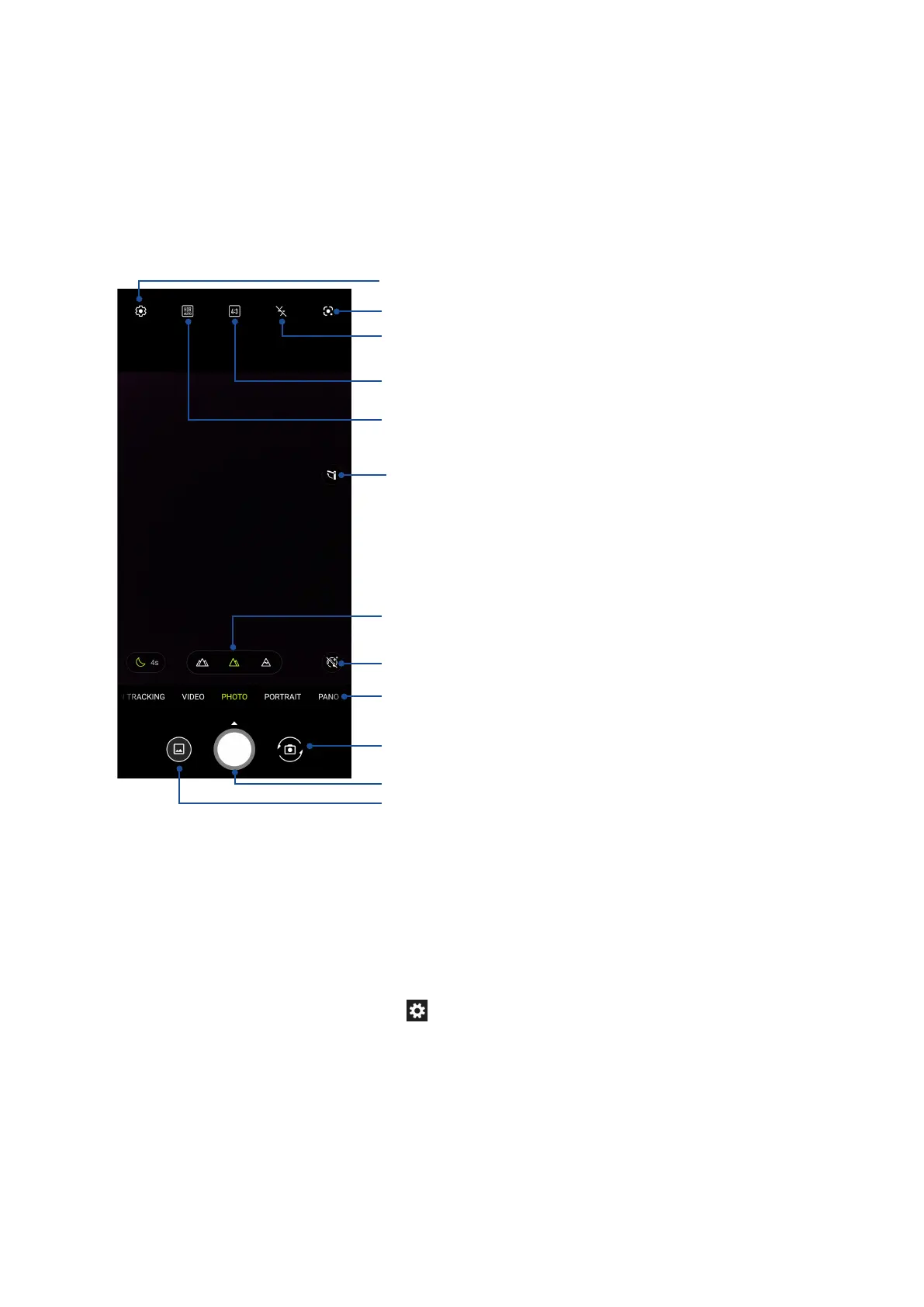
Tap the icons to start using your camera and explore the image and video features of your ASUS
Phone.
Adjust camera settings
Switch between screen modes
See the Gallery
Shutter button
Swipe to the right/left to use advanced camera settings
Tap to use Google Lens
Slide up to long press to trigger camera ip
Touch to switch between Normal mode, Wide Angle mode and 3X
optical zoom
Switch between HDR features
Switch between ash features
Enable or disable the Beauty feature
Tap to ip the camera to a pre-set angle














 To Next Page