EasyManua.ls Logo

ATAGO CM-800OL - User Manual

ATAGO CM-800OL
45 pages
Print Icon
To Next Page IconTo Next Page
Loading...
3564-E19
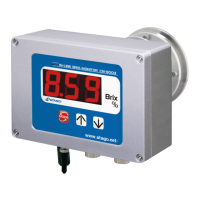
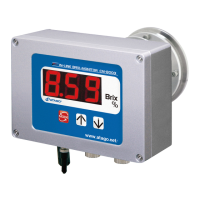
IN-LINE BRIX MONITOR
CM-800
Cat.No. 3564
Instruction Manual

Table of Contents

Questions and Answers

Summary

1. Precautions for Use

Introduction

Introduction to the instruction manual for the In-line Brix-Monitor.

Explanation of indications

Explains the meaning of WARNING and CAUTION indications for safe operation.

Explanation of symbols

Explains the meaning of warning, prohibition, and mandatory action symbols.

2. Refractive Index and Brix(%)

What is refractometer?

Defines a refractometer and its principle of measurement based on light refraction.

What is the Refractive Index?

Explains the concept of Refractive Index and its mathematical representation.

Brix(%) scale

Describes the Brix(%) scale, its relation to sucrose, and ICUMSA recommendation.

Temperature correction

Explains how the instrument automatically corrects measurements for temperature variations.

3. Unpacking and Installation

Configuration

Lists the main unit, standard accessories, and optional items included with the instrument.

Unpacking

Instructions for unpacking the main unit and confirming all parts are present.

Installation

Guidelines and precautions for installing the main unit and related components.

4. Names and Functions of Components

Main unit of the In-line Monitor

Details the parts and their respective functions on the main unit of the monitor.

Operation Display

Describes the digital display and operation keys for measurements and settings.

AC Adapter AD-32, AD-33 or AD-34 (Optional)

Details the AC adapter, its power cable, DC output cable, and pilot lamp.

5. Mounting the main unit and AC adapter (AD-33 or AD-34) (Optional)

6. Mounting the Sample Inlet Unit

Installation of the main unit with the sample inlet unit (optional)

Describes connecting the main unit with a sample inlet unit using fittings.

Mounting procedure

Step-by-step guide for mounting the main unit and sample inlet unit.

Use of tie bands

Instructions on using tie bands for securing the hose connector.

Installation of the main unit without the sample inlet unit (optional)

Details installation of the main unit directly to piping without a sample inlet unit.

7. Connecting the Power Cable or AC Adapter (AD-33 or AD-34) (Optional)

When the main unit is used alone

How to connect the DC24V power input cable to the main unit and power supply.

When the AC adapter AD-32, AD-33 or AD-34 (Optional)

How to connect the AC adapter's DC output cable to the main unit's power input.

8. External Output

Recorder output

Details the 4 to 20mA recorder output signal for Brix(%) and temperature.

RS-232 C output

Describes the RS-232C serial communication output for connecting to computers.

Preparing a PC for Data Transmission

Steps for setting up a PC with terminal emulator for data transmission.

9. Power Supply

When the main unit is used alone

Instructions for powering the main unit using a DC24V input cable.

When the AC adapter AD-32, AD-33 or AD-34 (optional) is used

Instructions for powering the unit using an AC adapter.

10. Measuring Brix(%)

11. Setting the temperature scale (°C;°F)

12. Setting the Measurement Interval and Mode-S

Measurement interval: c - #

Configures the time interval between measurements, from 1 to 5 seconds.

Mode-S level: d - #

Adjusts the measurement stability level for fluctuating sample readings.

13. Changing the Number of Decimal Place

14. Adjusting to the Reference

To reset the reference point to original factory settings

Procedure to restore the reference point to original factory settings.

15. Setting the Temperature Correction Values

About temperature correction

Explains why temperature correction is necessary for accurate liquid measurements.

Setting the temperature correction values for the instrument

Details how instrument correction values are set, with default sucrose values.

Setting procedure

Steps to input a new temperature correction factor for different sample types.

Inputting the temperature correction factor

Inputting the temperature correction factor

Steps to input a specific temperature correction factor for samples.

Obtaining the temperature correction factor for a sample constituent is other than sugar

Procedure to derive correction factors for samples with constituents other than sugar.

16. Setting the Recorder Output

17. Cleaning the Prism

18. Error Codes & Troubleshooting

19. Consumable Parts and Optional Items

Consumable Parts

Lists parts that are consumed during use and require periodic replacement.

Optional Items

Lists optional accessories available for purchase to enhance instrument functionality.

20. Relationships between Brix(%) Values and Refractive Index (nD) Values

21. Specifications

Environmental conditions

22. Dimensions

23. Repair Service and Warranty Period

Replacement Part Information

Information on the availability and process for obtaining replacement parts.

Periodic inspection service (charged)

Recommendation for periodic maintenance and inspection for long-term performance.

Summary

1. Precautions for Use

Introduction

Introduction to the instruction manual for the In-line Brix-Monitor.

Explanation of indications

Explains the meaning of WARNING and CAUTION indications for safe operation.

Explanation of symbols

Explains the meaning of warning, prohibition, and mandatory action symbols.

2. Refractive Index and Brix(%)

What is refractometer?

Defines a refractometer and its principle of measurement based on light refraction.

What is the Refractive Index?

Explains the concept of Refractive Index and its mathematical representation.

Brix(%) scale

Describes the Brix(%) scale, its relation to sucrose, and ICUMSA recommendation.

Temperature correction

Explains how the instrument automatically corrects measurements for temperature variations.

3. Unpacking and Installation

Configuration

Lists the main unit, standard accessories, and optional items included with the instrument.

Unpacking

Instructions for unpacking the main unit and confirming all parts are present.

Installation

Guidelines and precautions for installing the main unit and related components.

4. Names and Functions of Components

Main unit of the In-line Monitor

Details the parts and their respective functions on the main unit of the monitor.

Operation Display

Describes the digital display and operation keys for measurements and settings.

AC Adapter AD-32, AD-33 or AD-34 (Optional)

Details the AC adapter, its power cable, DC output cable, and pilot lamp.

5. Mounting the main unit and AC adapter (AD-33 or AD-34) (Optional)

6. Mounting the Sample Inlet Unit

Installation of the main unit with the sample inlet unit (optional)

Describes connecting the main unit with a sample inlet unit using fittings.

Mounting procedure

Step-by-step guide for mounting the main unit and sample inlet unit.

Use of tie bands

Instructions on using tie bands for securing the hose connector.

Installation of the main unit without the sample inlet unit (optional)

Details installation of the main unit directly to piping without a sample inlet unit.

7. Connecting the Power Cable or AC Adapter (AD-33 or AD-34) (Optional)

When the main unit is used alone

How to connect the DC24V power input cable to the main unit and power supply.

When the AC adapter AD-32, AD-33 or AD-34 (Optional)

How to connect the AC adapter's DC output cable to the main unit's power input.

8. External Output

Recorder output

Details the 4 to 20mA recorder output signal for Brix(%) and temperature.

RS-232 C output

Describes the RS-232C serial communication output for connecting to computers.

Preparing a PC for Data Transmission

Steps for setting up a PC with terminal emulator for data transmission.

9. Power Supply

When the main unit is used alone

Instructions for powering the main unit using a DC24V input cable.

When the AC adapter AD-32, AD-33 or AD-34 (optional) is used

Instructions for powering the unit using an AC adapter.

10. Measuring Brix(%)

11. Setting the temperature scale (°C;°F)

12. Setting the Measurement Interval and Mode-S

Measurement interval: c - #

Configures the time interval between measurements, from 1 to 5 seconds.

Mode-S level: d - #

Adjusts the measurement stability level for fluctuating sample readings.

13. Changing the Number of Decimal Place

14. Adjusting to the Reference

To reset the reference point to original factory settings

Procedure to restore the reference point to original factory settings.

15. Setting the Temperature Correction Values

About temperature correction

Explains why temperature correction is necessary for accurate liquid measurements.

Setting the temperature correction values for the instrument

Details how instrument correction values are set, with default sucrose values.

Setting procedure

Steps to input a new temperature correction factor for different sample types.

Inputting the temperature correction factor

Inputting the temperature correction factor

Steps to input a specific temperature correction factor for samples.

Obtaining the temperature correction factor for a sample constituent is other than sugar

Procedure to derive correction factors for samples with constituents other than sugar.

16. Setting the Recorder Output

17. Cleaning the Prism

18. Error Codes & Troubleshooting

19. Consumable Parts and Optional Items

Consumable Parts

Lists parts that are consumed during use and require periodic replacement.

Optional Items

Lists optional accessories available for purchase to enhance instrument functionality.

20. Relationships between Brix(%) Values and Refractive Index (nD) Values

21. Specifications

Environmental conditions

22. Dimensions

23. Repair Service and Warranty Period

Replacement Part Information

Information on the availability and process for obtaining replacement parts.

Periodic inspection service (charged)

Recommendation for periodic maintenance and inspection for long-term performance.

ATAGO CM-800OL Specifications

General IconGeneral
BrandATAGO
ModelCM-800OL
CategoryMonitor
LanguageEnglish

Related product manuals