The ATARI 5200 is an exciting video game system designed to provide many years of entertainment. This manual guides you through setting up, using, and maintaining your ATARI 5200, ensuring optimal performance and enjoyment.
Function Description
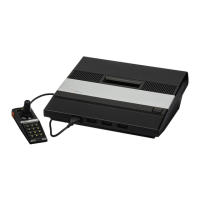
The ATARI 5200 is a home video game console that allows users to play a variety of video games by inserting game cartridges. The system includes a console unit, two 5200 controllers, a TV Antenna Switch Box, a Power Adapter, and two types of TV Switch Box Adapters (300 OHM to 75 OHM and 75 OHM to 300 OHM).
The console unit serves as the central processing unit for the games. It features a slot for game cartridges, controller jacks for connecting the 5200 controllers, a POWER ON/OFF switch, and a channel selector switch (for Channel 2 or 3). When the console is powered on, a red LED light indicates its active status.
The 5200 controllers are the primary input devices, allowing players to interact with games. Each controller features a joystick for movement in any direction (right, left, up, down, diagonally, and all around), two fire buttons (one on each side, with the lower buttons typically used for all games and upper buttons for specific game functions), and a numeric keypad (0-9, *, #). Additionally, each controller includes START, PAUSE, and RESET buttons.
The TV Antenna Switch Box is a crucial component for connecting the ATARI 5200 to your television set. It allows you to switch between viewing regular television programs and playing games on the console. The switch box has a STANDBY/NORMAL switch. In the NORMAL position, the ATARI 5200 game playfield is displayed. In the STANDBY position, you can view regular television programs even while the 5200 is powered on. This feature is useful for saving high scores, allowing a game to run in the background, or taking turns while watching TV. The TV Switch Box Adapters are provided to ensure compatibility with different types of television antenna connections (300 OHMs flat twin-lead wire or 75 OHMs round cable).
Usage Features
Setting Up the Console:
- Unpacking: Upon removing the ATARI 5200 from its box, you will find the console unit, a game cartridge, two 5200 controllers, the TV Antenna Switch Box, the Power Adapter, and the two TV Switch Box Adapters.
- Protective Coating Removal: The console unit comes with a protective plastic coating on its top surface, which should be peeled off before use.
- TV Antenna Switch Box Installation:
- Inspect your television's antenna connection to determine if it uses 300 OHMs (flat twin-lead wire) or 75 OHMs (round cable).
- Follow the specific instructions provided in the manual (pages 5-9) that match your television's antenna type. This may involve using one or both of the provided Switch Box Adapters or no adapter at all.
- Caution: Only use the provided TV Antenna Switch Box with the ATARI 5200. Using it with other units can cause severe damage. Ensure all connections are securely tightened.
- The TV Antenna Switch Box can be permanently attached to the back of your television set by peeling off its protective paper and sticking it near the antenna terminals.
- Set the STANDBY/NORMAL switch on the TV Antenna Switch Box to NORMAL for game viewing.
- Console Connection:
- Plug the Game Cable from the console unit into the GAME connector on the TV Antenna Switch Box.
- Insert the Power Adapter cable jack into the POWER plug on the TV Switch Box.
- Plug the Power Adapter into a convenient 120-volt AC electrical wall outlet. Important: Only use the Power Adapter packed with your ATARI 5200 to prevent damage to the console.
- Television Setup:
- Set your television channel selector to Channel 3. If Channel 3 is broadcasting in your area, set it to Channel 2 and change the console's channel selector switch accordingly.
- Turn on your television and adjust the volume.
- Press the POWER ON/OFF switch on the console to ON.
- If your television has an automatic fine-tuning control, turn it off and manually fine-tune for the best picture. If color is only received with automatic fine-tuning on, leave it on.
Inserting a Game Cartridge:
- Hold the game cartridge with the label facing you and right-side-up.
- Carefully insert the cartridge into the slot at the center of the console. Ensure it fits firmly but do not force it.
- With the console POWER ON, a colorful ATARI logo will appear on your television screen, followed by the game playfield.
Using the 5200 Controllers:
- Connecting Controllers: Plug the controllers into the controller jacks at the front of the console unit. Use jack 1 for one-player games, and jacks 1 and 2 for two-player games. The jacks are designed to fit only one way; ensure a firm connection without forcing it.
- Joystick: Move the joystick to control game pieces in any direction on the screen.
- Fire Buttons: Use the lower fire buttons for all games. The upper buttons have functions that vary depending on the specific game. Refer to your game instructions for details. You can use either the right or left fire buttons, whichever is more comfortable.
- Keypad: The numeric keypad (0-9, *, #) is used for selecting different game options. Refer to game instructions for specific functions.
- START Button: Press START to begin game play.
- PAUSE Button: Press PAUSE to temporarily stop all game action. This allows you to leave the game without interrupting the game or score. Press PAUSE again to resume play.
- RESET Button: Press RESET only when you want to restart the game from the beginning.
- Keypad Overlays: Each game cartridge comes with two keypad overlays that fit directly over the controller keypad buttons. These overlays indicate the specific functions of the keypad buttons for that game. When not in use, the overlays can be stored in slots on the back of the game cartridge.
Returning to Television Program Viewing:
- Press the console POWER switch to OFF. The TV Antenna Switch Box will automatically switch back to regular television program viewing.
- If you manually turned off automatic fine-tuning, turn it back on.
Maintenance Features
To ensure many years of enjoyment and keep your ATARI 5200 in good working condition, follow these maintenance guidelines:
- Power Management: Always turn the POWER switch OFF when the game system is not in use. Unplug the Power Adapter from the electrical outlet when not in use.
- Cartridge Handling: Do not try to force game cartridges into the cartridge slot.
- Liquid Avoidance: Do not spill liquids on the console, cartridges, or controllers.
- Cable Care: Do not lift the 5200 console or controllers by their connecting wires. This can bend or crimp the wires and break the internal insulation.
- Physical Protection: Be careful not to drop the console, controllers, or game cartridges.
- Temperature Control: Do not expose the console, controllers, or game cartridges to extreme or excessive heat.
- No User-Serviceable Parts: The ATARI 5200 console, controllers, and cartridges contain no user-serviceable parts. Do not attempt to disassemble or alter them.
- Power Adapter Usage: Only use the Power Adapter packed with your ATARI 5200. Using any other power supply can damage the electronic components.
- TV Switch Box Usage: Only use the TV Antenna Switch Box packed with your ATARI 5200. Using other switch boxes can damage the electronic components.
- Cleaning: Clean the exterior surface of the console with a soft, slightly damp cloth (use water only).
- Phosphor Burn-in Prevention: The ATARI 5200 is engineered to minimize phosphor memory or "burn-in" on your television screen. However, it is recommended to turn down the contrast of your television set and turn the ATARI 5200 OFF when not in use as a precaution.
Controller Storage:
When not in use, the 5200 controllers can be stored inside the console unit:
- Unplug the controllers from the jacks at the front of the console.
- Open the controller storage area at the top of the console.
- Wind the controller cable around the joystick.
- Place the controllers face down (head-to-head) in the storage area.
- Gently close the cover of the controller storage area.
Compliance with FCC Regulations:
To comply with Federal Communications Commission (FCC) regulations and prevent interference with television reception, observe the following:
- Do not install a longer antenna cable from the TV Antenna Switch Box to the television antenna connection than the one supplied.
- Do not connect the antenna output cable on your TV Switch Box directly to any television antenna or Cable TV outlet.
- Do not attach loose wires to your television antenna terminals when using the ATARI 5200.
- If interference occurs, try reorienting the receiving antenna, relocating the computer relative to the receiver, or moving the computer to a different electrical branch circuit. Consult an experienced radio/television technician if necessary.

 Need help?
 General


 To Next Page
