Chapter 5. Profile-X Web Portal
63
Board
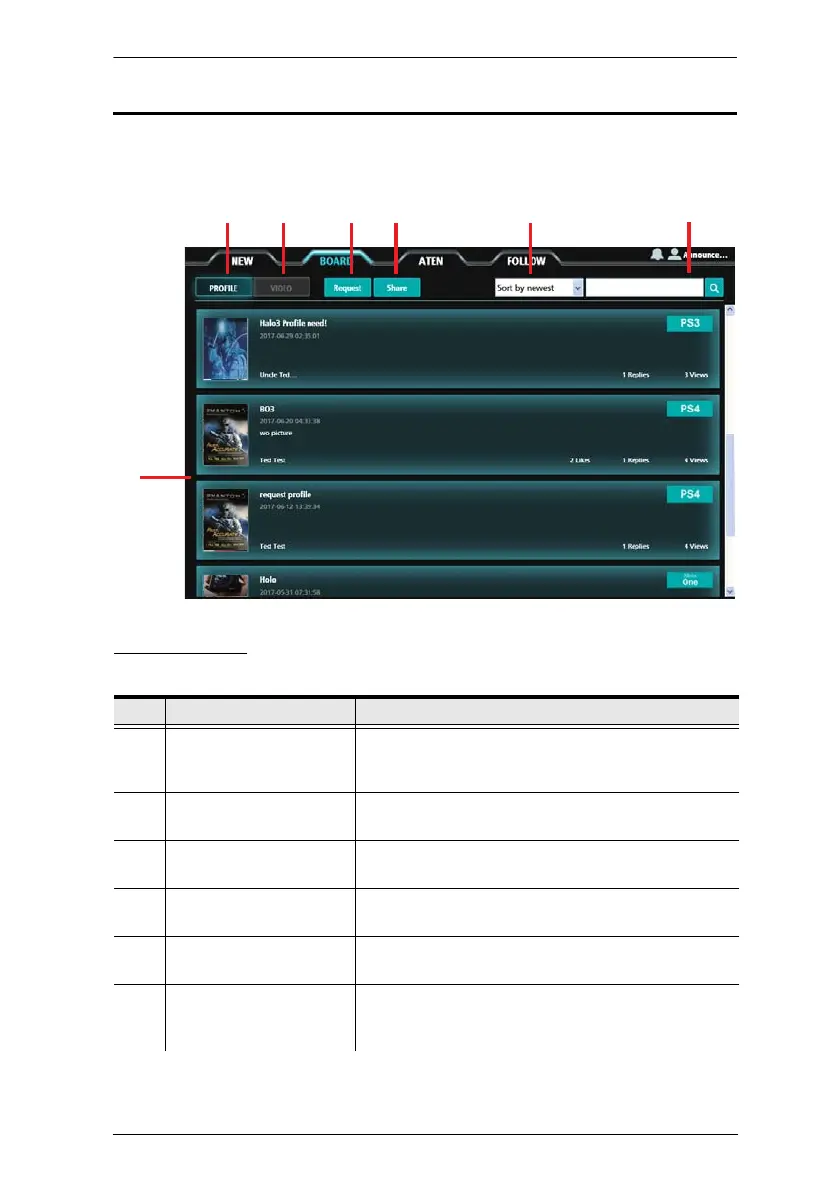
The Board tab allows you to share and request Phantom-S profiles and videos.
Components
The components are described in the table, below:
No. Item Description
1 Interactive Display Panel This is the main interactive area where you can click
to view, post and download content on the message
boards.
2 Profile Click to open the Profile board which allows you to
download and request Phantom-S profiles.
3 Video Click to open the Video board which allows you to
view and share video links.
4 Request Click to post a message requesting other users to
share a game specific Phantom-S profile.
5 Share Click to post a message that shares a profile
uploaded from your Phantom-S device.
6 Sort This drop-down menu sorts the order of posts on the
message board. Options are: Sort by newest or Sort
by oldest.
1



 To Next Page