Phantom-S User Manual
66
ATEN
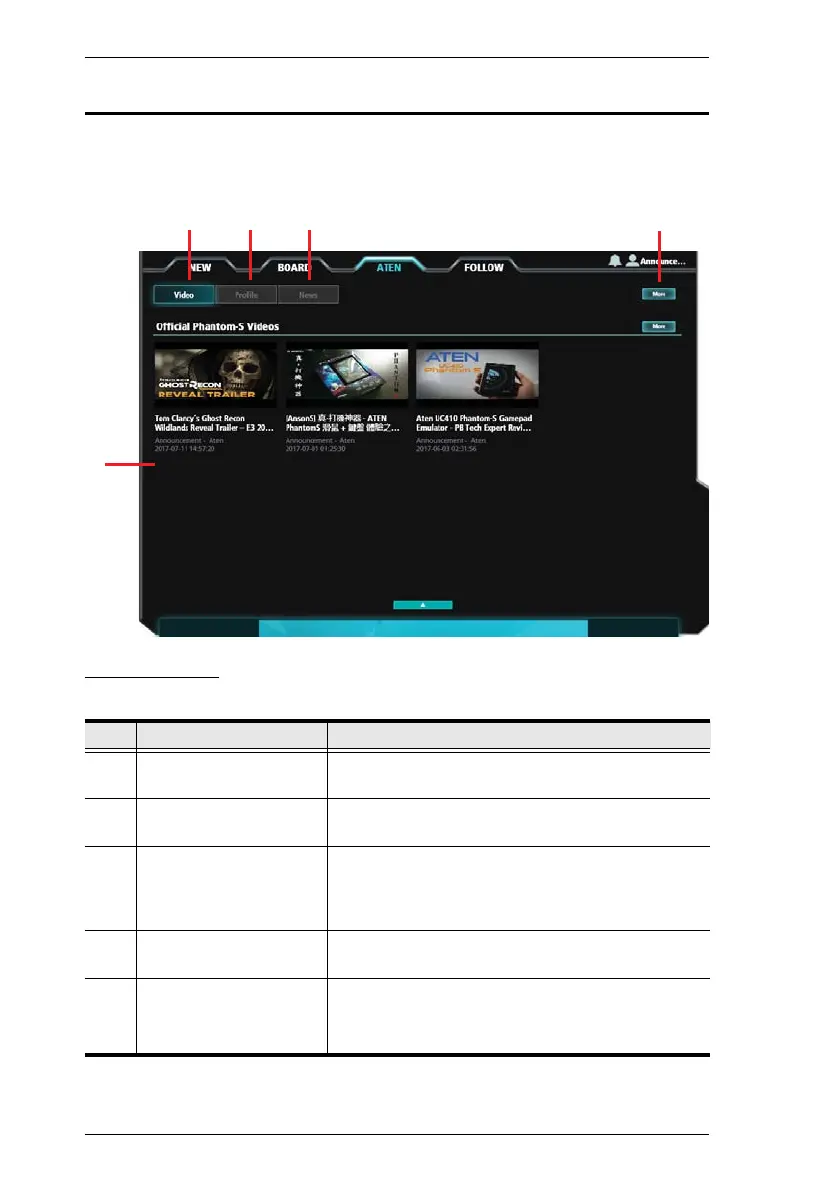
The ATEN tab provides posts by ATEN with the latest Phantom-S news and
updates.
Components
The components are described in the table, below:
No. Item Description
1 Interactive Display Panel This is the main interactive area where you can view
and download content posted by ATEN.
2 Video Click to open the Video board to view videos posted
by ATEN.
3 Profile Click to open the Profile board to view profiles
posted by ATEN. To use a profile, select a post and
click Download, then follow the instructions to save
it to your Phantom-S device.
4 News Click to open the News board to view the latest
Phantom-S updates posted by ATEN.
5 More Clicking More opens a page that provides additional
content within the relevant selection.
Click
< to return to the main page.



 To Next Page