
 Need help?
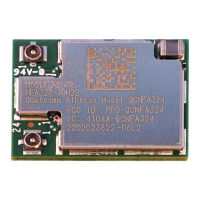
Do you have a question about the Atheros Qualcomm QCNFA324 and is the answer not in the manual?
Defines formatting for commands, file names, paths, and variables.
Highlights neutral or positive information and important points in the text.
Provides an overview of the Atheros 802.11n + Bluetooth Adapter and its client utility.
Lists the necessary hardware and software for the system to operate.
Explains how to add new or edit existing configuration profiles for network settings.
Details the steps to delete a saved network configuration profile from the system.
Explains how the adapter automatically selects profiles for network connection based on priority.
Guides on how to activate different saved profiles for network connections.
Instructions on how to save and load network configuration profiles.
Steps to configure the network adapter's IP address and related settings.
Describes fields for profile name, client name, and network names (SSIDs).
Covers settings like transmit power, power save mode, network type, and authentication.
Details options for WPA/WPA2, 802.1x, and Pre-Shared Key (Static WEP) security.
Explains how to configure EAP-TLS security, requiring client certificates.
Details configuration for EAP-TTLS security, often used with certificates and username/password.
Covers PEAP security using EAP-GTC, with options for resume secure session and user name.
Instructions for configuring PEAP security with MSCHAP V2 authentication.
Guide to setting up LEAP security, requiring infrastructure device configuration.
Explains how to define and configure WEP encryption keys for network security.
Steps to replace an existing WEP key with a new one for security.
How to disable static WEP security for a specific network profile.
Configuration steps for WPA/WPA2 security using a passphrase.
Describes Windows XP's automatic wireless network management and its interaction with ACU.
Introduces tools for viewing current diagnostics and status information.
Details general information displayed on the Current Status tab, such as profile name and link status.
Provides general information about the wireless network adapter and its driver.
Offers retrieval of receive and transmit statistics for the wireless adapter.
Instructions on how to scan for available wireless networks.
Steps to connect to a network if no existing profile is found.
Configures signal strength display units, refresh interval, and data display.
Lists various utility functions accessible via the Action menu for managing the adapter.
Describes the appearance and functions of the system tray icon for the Atheros Client Utility.
Displays detailed connection information, including active profile, link quality, and SSID.
Explains operation in ad hoc mode where stations communicate directly without an access point.
Guides on configuring profile settings specifically for ad hoc network connections.
Describes infrastructure mode where stations communicate via an access point.
Details profile settings for configuring infrastructure (access point) mode.
Steps to remove an existing NDIS driver before upgrading.
Overview of security features like MIC, TKIP, and broadcast key rotation.
Introduces the chapter covering installation, uninstallation, and usage of the Bluetooth Suite.
Describes the process of installing the Bluetooth Suite software and drivers.
Instructions on obtaining the Bluetooth Suite software from the Atheros support website.
Step-by-step guide for installing the Bluetooth Suite using a CD.
Instructions on how to start and access the Bluetooth Suite application.
Provides an overview of the main screen and components of the Bluetooth Suite GUI.
Describes the main menu options available in the Bluetooth Suite screen.
Details the configuration screen for managing Bluetooth tasks, device recovery, and filters.
Displays discovered Bluetooth devices and their associated services and status.
Provides instructions for removing the Bluetooth Suite software from the system.
Guides on how to connect Bluetooth Human Interface Devices like a mouse.
Lists the necessary devices and equipment for connecting HID devices.
Describes how to connect a Bluetooth laptop to a device for profile synchronization.
Lists the required devices and equipment for synchronizing data.
Provides detailed operational information and statistics for the wireless adapter.
Regulatory compliance statement regarding RF interference and device operation.
Compliance information for Industry Canada regulations, including antenna gain and frequency restrictions.
Statement on compliance with IC radiation exposure limits for uncontrolled environments.
Certification details for Japan Telecom, addressing radio interference in residential areas.
 General
| Model | QCNFA324 |
|---|---|
| Frequency Bands | 2.4 GHz, 5 GHz |
| Bluetooth | Yes |
| Manufacturer | Qualcomm |
| Wi-Fi Standard | IEEE 802.11a/b/g/n/ac |

 To Next Page