1
Installing the telephone base
Operating range of the handset
Signal strength
When the handset is within the operating range of the telephone base, appears on the screen. If
the handset is out of range of range, the
symbol flashes on the display.Get closer to the telephone
base to turn off thisindicator.
Introduction
CAUTION: When using telephone equipment, there are basic safety instructions that should always be followed.
Refer to the Import safety instructions section in this book and save them for future reference.
IMPORTANT: Because cordless phones operate on electricity, you should have at least one phone in your home that isn’t
cordless, in case the power in your home goes out.
Getting Started
Package Contents
Make sure your package includes the items shown here.
Telephone Ba
se Unit
1 Cordless Handset
AC Adapter
Telephone Line Cord
2 Rechargeable AAA Ni-MH Batteries (1.2V, 300mAh)
User Manual
Installation
Important Installation Guidelines
• Avoid sources of noise and heat, such as motors, fluorescent lighting, microwave ovens, heating
appliances and direct sunlight.
• Avoid areas of excessive dust, moisture and low temperature.
• Avoid other cordless telephones or personal computers.
• Never install telephone wiring during a lightning storm.
• Never install telephone jacks in wet locations unless the jack is specifically designed for wet locations.
• Never touch non-insulated telephone wires or terminals, unless the telephone line has been
disconnected at the network interface.
• Use caution when installing or modifying telephone lines.
This WPS01 Cordless phone is compliant with the DECT 6.0 standard which operates in the 1.92GHz to
1.93GHz frequency range.
The telephone base should be placed at least 1 meter away from other electrical appliances in order
to avoid interference. The handset exchanges radio signals with the telephone base. The strength of
these signals depends on the position of the base. You can obtain a stronger signal by placing the
base higher.
The operating range of your telephone is 300 meters outdoors without obstructions between the
telephone base and handset. Obstructions reduce the operating range. When the telephone base is
located indoors, while the handset is indoors or outdoors, the operating range is reduced to 50 meters.
Thick concrete walls reduce the operating range significantly.
2
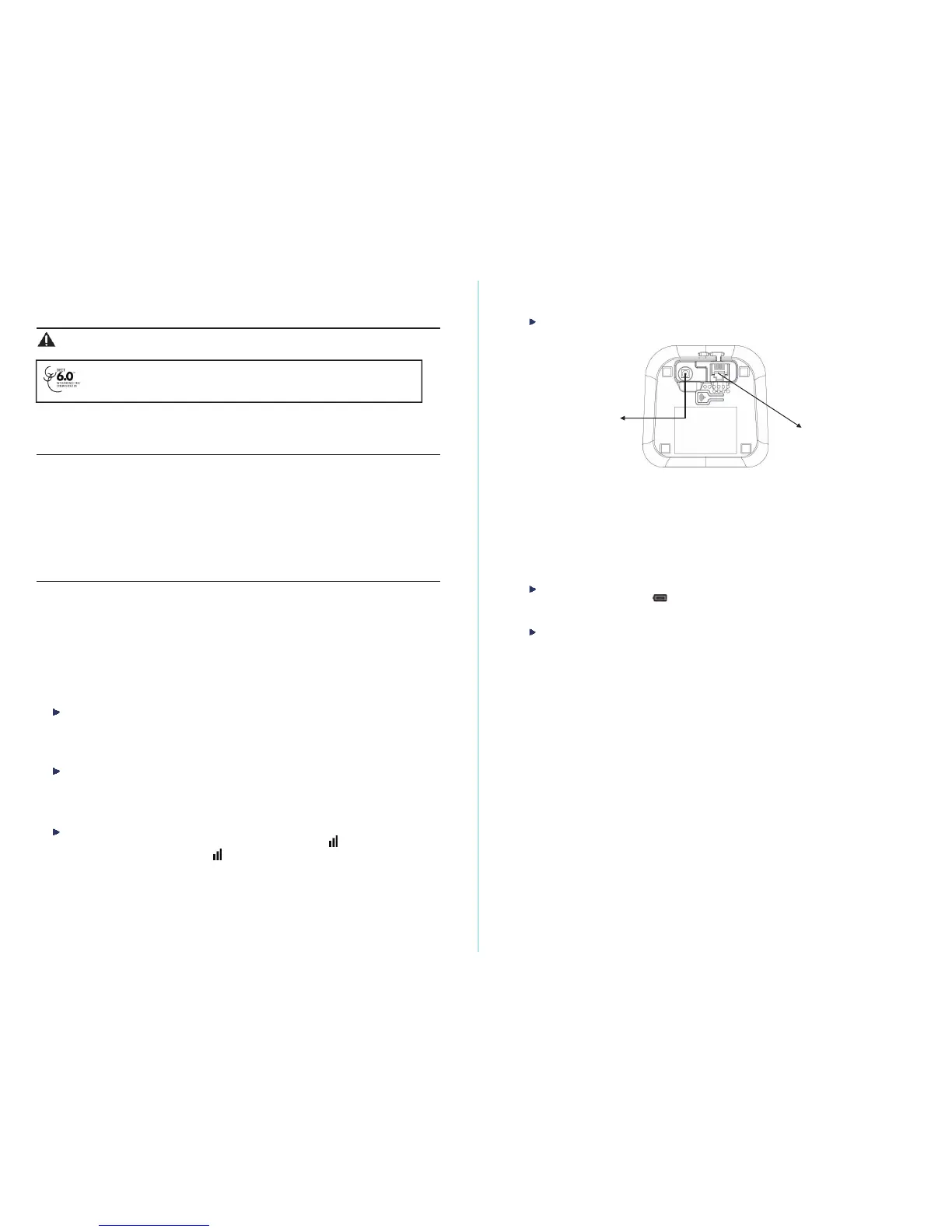
Installing and charging the batteries
Adapter Jack
Telephone Jack
1.
Insert the plug of the supplied adapter to the back of the telephone base and the other end intoan
electrical outlet.
2.
Plug the telephone line cord to the back of the telephone base and the other end into a telephone wall
jack.
3.
Insert the rechargeable Ni-MH batteries supplied into the handset by following the correct polarity as
indicated. Close the battery compartment.
4.
Place the handset onthe telephone base and let the batterieschargefor 24 hours before using itfor the
first time.
Low battery warning
When the batteries are very low,
flashesonthe handset screentopromptyou torechargethe
batteries.
Battery performance
When fully charged, the batteries offer approximately 9 hours of talk time and 100 hours of standby time
under ideal conditions. Please note that a new battery reaches its full capacity after several days of normal use.
The battery capacity decreases over time, reducing the talk time and standby time. Replace the batteries if
necessary.
The batteries and the handset will become hot during charging. This is normal.
Tip
When you are not using your handset, place it on the charger so that you can always have fully charged
batte
ries.


 To Next Page
 Loading...