7
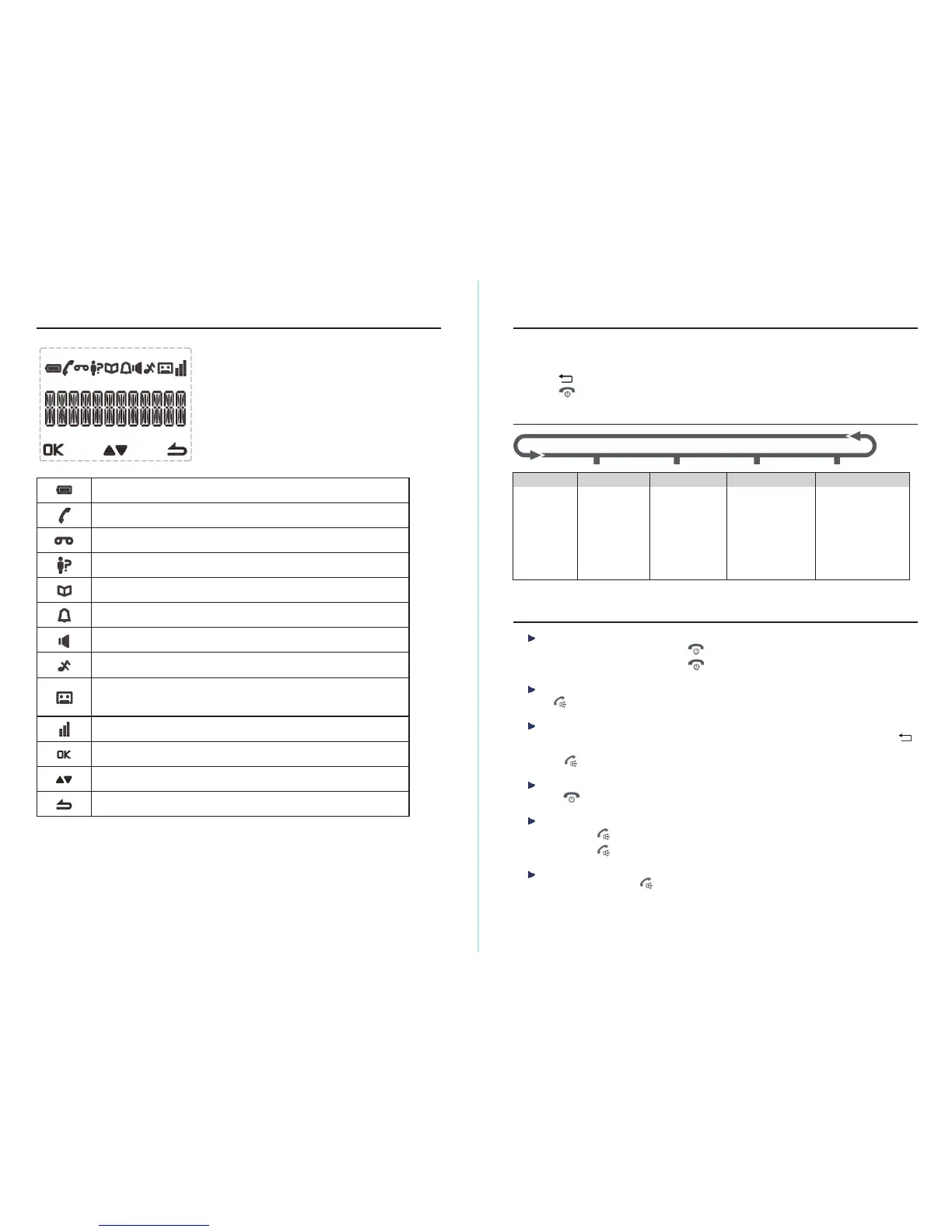
Displays when a new coming call and hasn’t been viewed yet.
Displays steadily when answering machine is ON.
Flashes when there are new answering machine messages.
Flashes quickly when answering machine message is full.
Handset Display Icons
Displays when phonebook is open.
Displays when an alarm clock is set.
Displays when ringer is set to off.
Indicate a confirmation of selected menu.
Indicate more menu options or increase/decrease volume during a call.
Indicate to return to previous menu or delete a wrong entry.
Displays steadily when the battery is full.
Flashes when the battery is almost empty.
Displays steadily when having an external call.
Flashes when having an internal call.
Indicates for signal strength.
Flashes when handset is not registered to the base or if you go out of range.
Displays when there is a new voice message is received from the network.
Displays when handsfree mode is activated.
8
Using The Menu
Press MENU button to open the menu.
Press▲ or ▼button to scroll the menu option.
Press OK button to confirm menu selection or the setting displayed.
Press
button to return to previous menu.
Press
to exit a menu or cancel an operation at any time to return to standby mode.
Menu Map
PERSONAL SET
HANDSET NAME
RINGER & TONE
LANGUAGE
AUTO HANG -UP
CLOCK & ALARM
DATE & TIME
SET FORMAT
ALARM
ALARM TONE
PHONEBOOK
NEW ENTRY
LIST
EDIT ENTRY
DELETE ALL
DELETE ALL
DIRECT MEM.
ADVANCE SET
CHANGE PIN
REGISTRATION
UNREGISTER
RESET
FLASH
(RECALL TIME)
DIAL MODE
ANSWERING MACHINE
PLAY
DELETE ALL
ANSWER ON/OFF
RECORD OGM
ANSWER MODE
SETTINGS
RING DELAY
REMOTE
LANGUAGE
Using Your Telephone
Switch the handset on/off
When your handset is off, press and hold until the screen turns on.
To switch off the handset, press and hold
until the screen turns off.
Make a call
Press . When you hear the dial tone, dial the phone number.
Preparatory dialing
1.
Enter the phone number first. The number is shown on the display. If you make a mistake, press
button to delete a digit.
2.
Press to dial the number.
End a call
1. Press or place the handset back on the base/charger.
Speakerphone
1.
You can press twice to make or answer a call in speakerphone mode.
2.
You can press each time you wish to switch between handset and speakerphone mode.
Receiving calls
When the phone rings, press to answer the call.



 To Next Page