EN
4
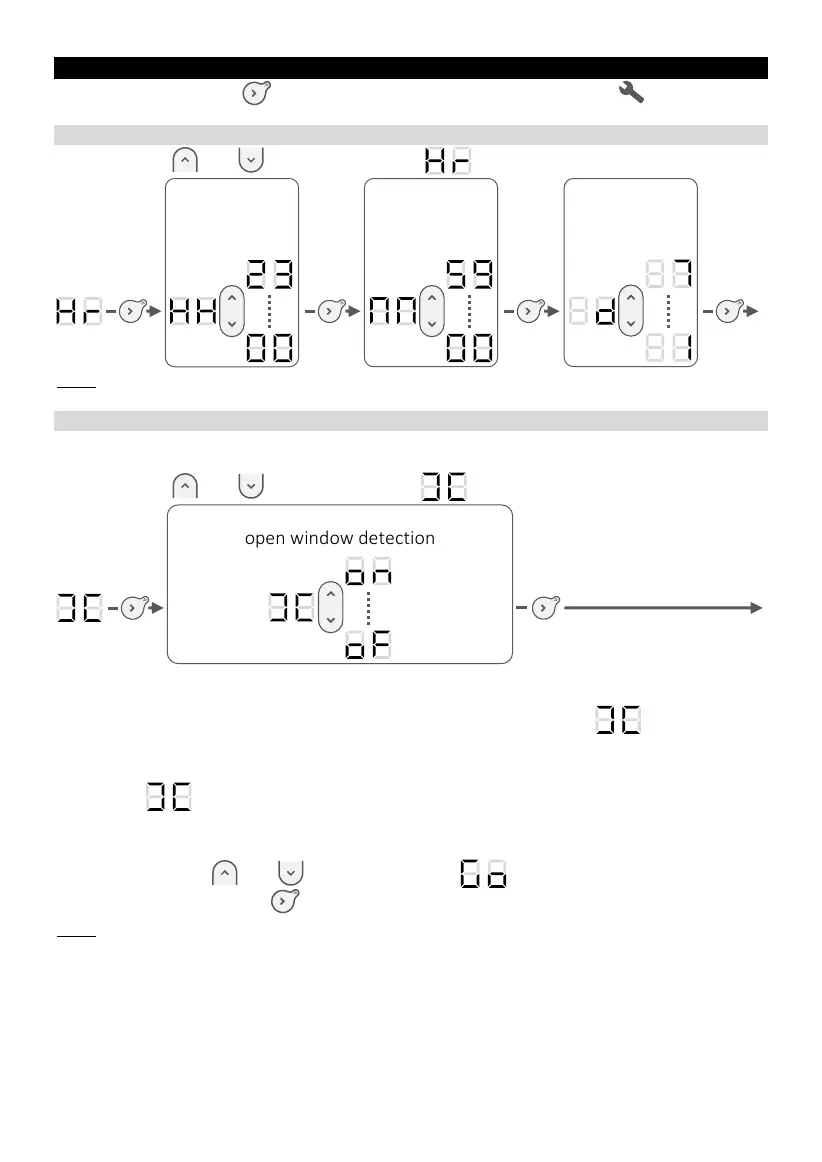
APPLIANCE SETTINGS
Press the button
until the indicator below the pictogram
lights up. The
settings menu contains:
SETTING THE TIME AND DAY OF THE WEEK
Using buttons and , select parameter
Note: after appliance switch Off / On, it may be necessary to re-set the time and day of
the week.
ACTIVATION / DEACTIVATION THE OPEN WINDOW DETECTION
Allows to detect the temperature change caused by opening and closing the
window.
Using buttons and , select parameter
If you forget to switch off the appliance before long-term ventilation of the room,
this function prevents unnecessary heating.
If appliance detects that window is opened, the parameter flashes on the
screen and appliance switches automatically to frost protection mode (7°C).
If appliance detects that window is closed or the cycle is stopped manually, the
parameter will disappear from the screen and appliance will return to the previous
operating mode.
To manually stop the open window detection cycle:
- Using buttons and , select parameter ;
- Confirm using button .
Note: it is not recommended to use this function in rooms with a draught, for example in
corridors or in rooms near the front door.








 To Next Page