EasyManua.ls Logo

Atlas WBT-210 - User Manual

Atlas WBT-210
17 pages
Print Icon
To Next Page IconTo Next Page
Loading...
1
Question and Answer IconNeed help?

Do you have a question about the Atlas WBT-210 and is the answer not in the manual?

Overview

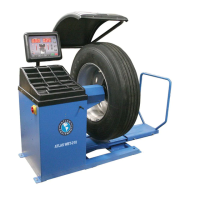
The Atlas WBT-210 is a truck wheel balancer designed for accurately balancing truck wheels and tires. It features a control panel with various indicators and keys for operation and calibration.

Function Description:

The primary function of the Atlas WBT-210 is to measure and correct imbalances in truck wheels and tires. It operates in both static and dynamic balancing modes, allowing for comprehensive balance adjustments. The machine guides the user through the balancing process, indicating where and how much weight needs to be applied to achieve optimal balance. It supports different wheel types, including hub-centric wheels, and provides specific calibration procedures for both passenger car/light truck and semi-truck wheels.

Important Technical Specifications:

The balancer's display shows both inside and outside weight measurements, along with indicators for weight location and aluminum wheel modes. Key functions include:

  • Static/Dynamic Mode Key: Switches between static and dynamic balancing modes.
  • Aluminum Wheel Mode Key: Changes weight application locations for custom or alloy wheels.
  • Menu Navigation Keys: Used for selecting various settings and adjustments.
  • "A" Distance Keys (A+/A-): Enter the distance from the balancer to the wheel (measured in millimeters).
  • "B" Width Keys (B+/B-): Enter the width of the wheel (measured in inches).
  • "D" Diameter Keys (D+/D-): Enter the diameter of the wheel (measured in inches).
  • Fine Measurement Key: Displays exact imbalance measurements (rather than rounded values).
  • Start Key: Initiates the wheel spin when the hood is closed.
  • Stop Key: Exits functions or stops the balancer.

The machine supports switching between grams and ounces for unbalance measurement units. Calibration procedures involve specific weights: a 3.5 ounce (100 gram) passenger car/light truck calibration weight and a heavy truck calibration weight. The measuring rod for "A" distance is marked in centimeters, requiring conversion to millimeters (multiply by 10) for input into the machine.

Usage Features:

The Atlas WBT-210 offers a user-friendly interface with clear indicators and a logical workflow for balancing.

  • Control Panel: Features separate displays for inner and outer weight, weight indicators, and mode indicators (DYN, STA, ALU).
  • Menu System: Allows access to various settings, including:
    • OPT function: Adjusts parameters like diameter (mm/inch), width (mm/inch), wheel guard on/off, start from guard closing, and approximate weight sensitivity (1-5g or 0.1-0.25oz).
    • BEEP on/off: Toggles audible alerts.
    • SET UP menu: Contains self-diagnosis and calibration options.
    • g/oz unbalance measurement unit: Allows selection of grams or ounces.
  • Calibration Process: Detailed step-by-step instructions are provided for both passenger car/light truck and semi-truck wheels. This includes:
    • Selecting the correct wheel and tire (hub-centric, steel, no prior weights).
    • Mounting the wheel securely using appropriate cones and nuts.
    • Manually entering "A" (distance), "B" (width), and "D" (diameter) measurements.
    • Initiating a spin cycle to measure initial imbalance.
    • Applying the specified calibration weight (e.g., 3.5 ounces/100 grams) at designated positions (12 o'clock) and performing subsequent spins.
    • Removing the calibration weight and performing a final spin to confirm calibration.
  • "Push Start" Feature: For semi-truck wheels, giving the wheel a manual push to start spinning before lowering the hood reduces strain on the motor.

Maintenance Features:

While the manual does not explicitly detail maintenance features, the presence of a "SELF-DIAGNOSIS" function within the SET UP menu suggests built-in diagnostic capabilities to assist with troubleshooting and maintenance. The calibration procedures themselves are a form of routine maintenance, ensuring the accuracy and reliability of the balancer over time. The manual emphasizes the importance of correct calibration for accurate balancing, highlighting that failure to follow instructions will lead to incorrect calibration and poor balancing accuracy. The disclaimer also notes that the Atlas WBT-210 is not equipped with an Automatic Data Entry System, implying that manual input of wheel dimensions is a standard operational aspect.

Atlas WBT-210 Specifications

General IconGeneral
BrandAtlas
ModelWBT-210
CategoryWheel Balancers
LanguageEnglish

Related product manuals