the computer through the data cable to export.
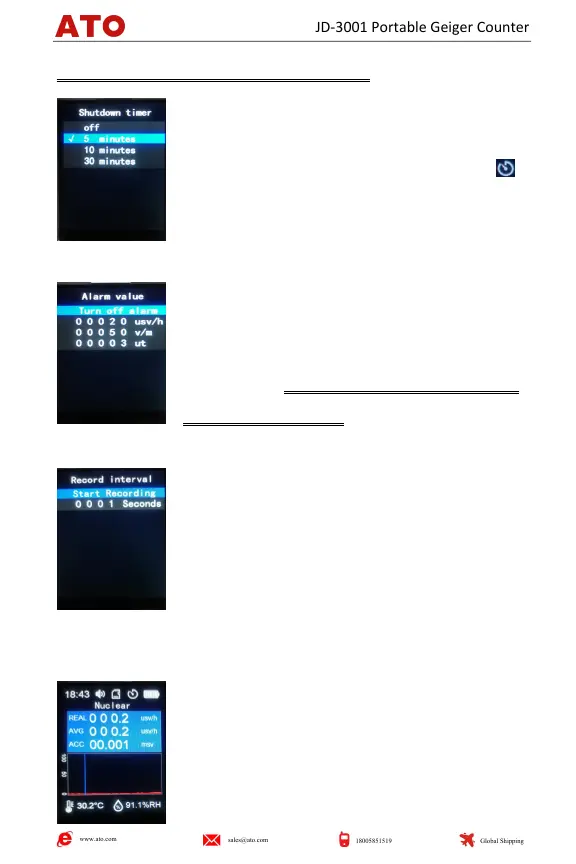
6. Shutdown timer : Move the cursor bar to the
desired option, and press the "SET" button to
confirm. The default shutdown is 5 minutes. The
icon is displayed on the screen.
Long press "SET" button to return to the previous
operation page.
Alarm value: move the cursor bar to the desired
option, short press the "SET" button, the
background turns red, press the "+" button or "―"
button to set. The picture on the left shows the
default alarm threshold.
Long press "SET" button to return to the previous operation page.
8. Record interval: Move the cursor bar to the
desired option, short press the "SET" button, the
background turns red, press the "+" button or "―"
button to set. The default logging interval is 1
second.
Long press the "SET" button to return to the previous operation page.
Ⅴ.LCD Monitor Introduction
REAL: Real-time dose display
AVG: Average display
ACC: Cumulative dose display
Real-time trend chart
www.ato.com
sales@ato.com
18005851519
Global Shipping
JD-3001 Portable Geiger Counter


 To Next Page