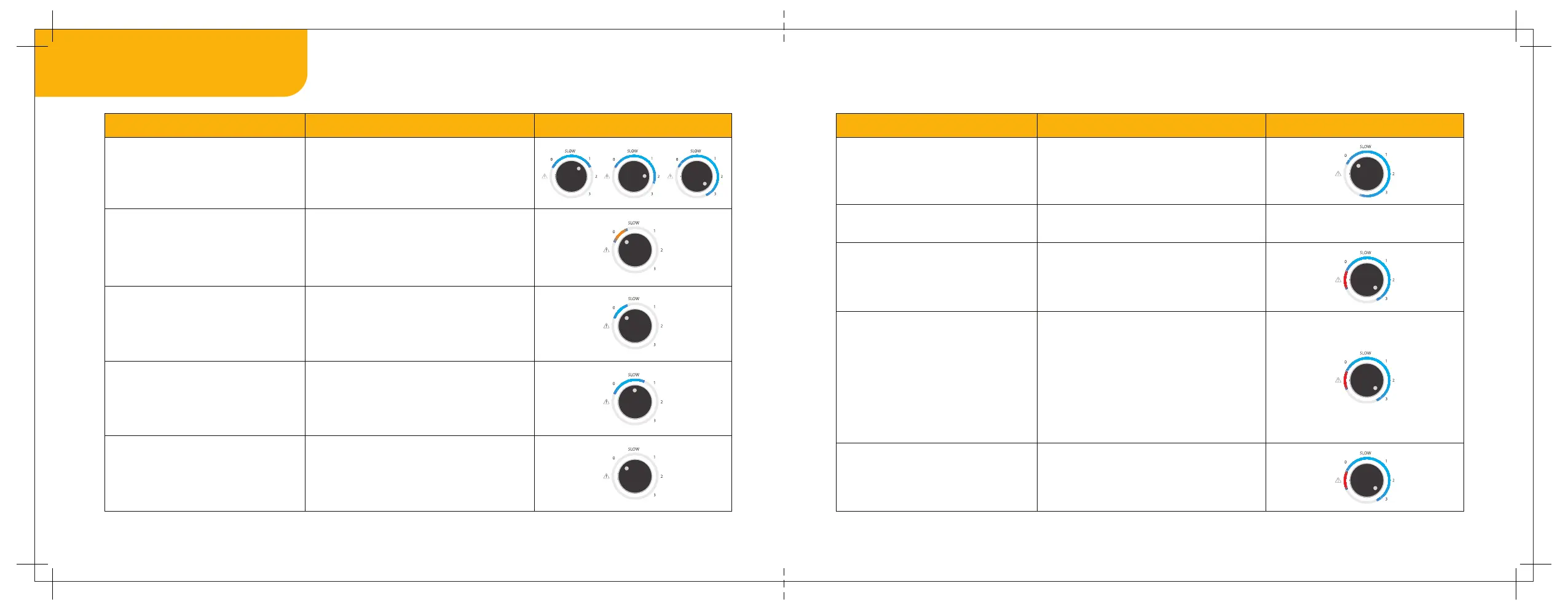
Mixer grinder is OFF and not
connected to the power source
Action LED indication Image
7. LED indication
Mixer grinder is ON and
the jar is locked properly
Mixer grinder is ON and connected
to a power source but no jar
is placed on the mixer grinder
Knob is set at Slow Mode.
No LED indication
The LED will turn orange
The LED strip till ‘Slow’ will turn blue
The LED will now turn to blue with
short beeps to indicate that the jar
is properly locked
Knob is set at speeds 1, 2 and 3
Action LED indication Image
Power resumes when the knob
is set at any speed
Pulse mode/ When the chopper jar
is in use
Jar is suddenly removed during
running condition
The LED strip will turn blue till
the set speed option
The entire LED strip will turn blue
Sudden power failure while
MG 1 is in use
All lights will turn OFF
Red LED will glow. Other LED will blink
in blue colour.
The red light around the caution will
start glowing with longer buzzes. Please
reset the knob to ‘0’ to restart the
grinding/chopping process.
Overheating of motor/Overloading
The red light around the caution symbol
along with the blue light will start
glowing with long buzzes. Turn the
knob to 0 and let the mixer grinder rest
until the motor cools down (in case of
overheating) or remove excess material
(in case of overloading). Resume the
grinding or chopping process then.


 To Next Page