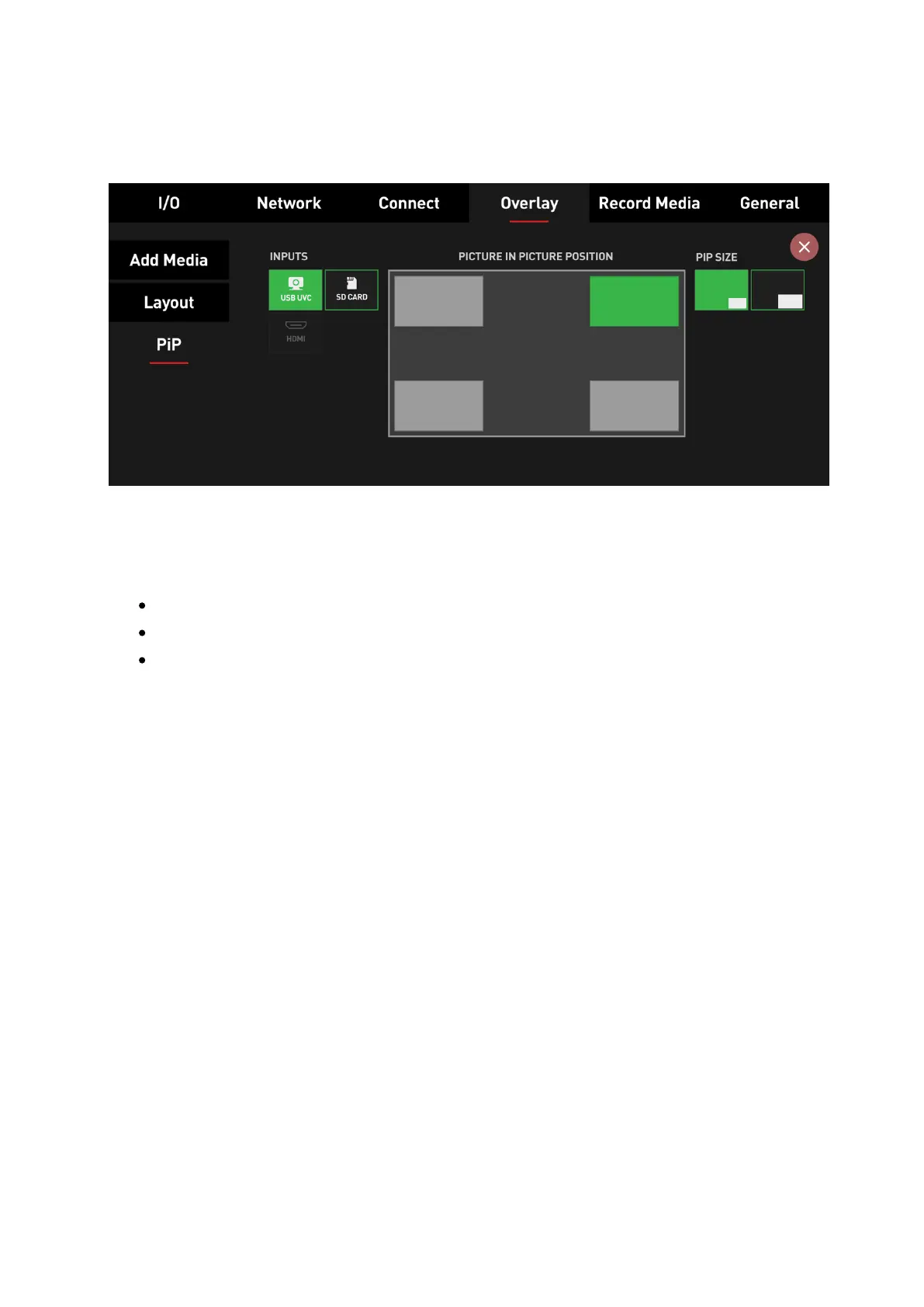
PiP:
With the release of AtomOS Lite 10.03.01, we've added the!ability to apply PiP overlays to
your program stream by choosing one out of three different sources. For configuration,
we've added the PiP menu to the Overlay tab.!
Selectable Picture-in-Picture sources include USB UVC, HDMI inputs, and also recorded
clips from the SD Card.
Choose USB or HDMI inputs as PiP sources over SD Card playback
Choose SD Card playback or HDMI inputs as PiP sources over USB
Choose SD Card playback or USB inputs as PiP sources over HDMI
PiP sources can be set to 1 out of 4 positions (top-left, top-right, bottom-left, bottom-right)
and 2 sizes (small & large).
Note: Whilst playing back recorded files from the SD card, either as the main feed or as a
PiP source, recording is disabled on the ZATO CONNECT since you can't record and
playback simultaneously. Streaming is available, though.
Note: PiP and Overlay presets can be used simultaneously to enhance the production value
of your streams.



 To Next Page