6 | P a g e
Cleaning the Revo Red HEPA and Foam Filters
• Turn off and unplug cleaner.
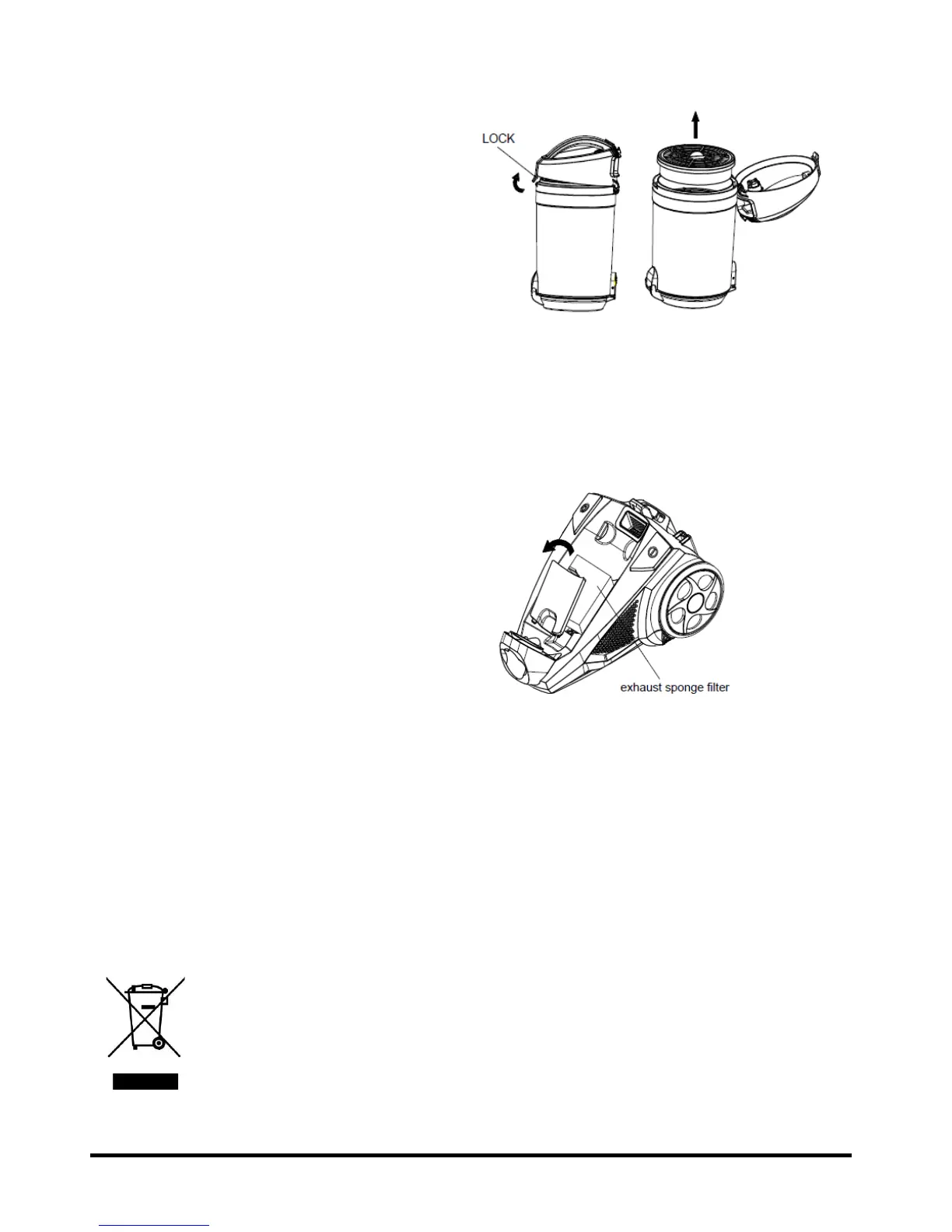
• Remove the dust bin.
• Open the dust bin cover and remove filters.
• For a quick clean, tap on side of garbage can.
• For a deep clean, rinse with water and dry.
• Insert the dry filters back into the dust bin
cover.
• To deep clean dust bin and chamber, twist and
unlock from assembly.
• Rinse with water and dry.
• Reassemble and attach to vacuum.
• Check whether the dust bin is securely seated.
IMPORTANT! Never use the vacuum cleaner without filters.
Cleaning the Revo Red Intake and Exhaust
Filters
The intake/exhaust air foam filters will rarely
require cleaning. You can use the same wet or
dry method as described above. Turn off.
Unplug. Remove. Clean. Dry. Install.
Cleaning the Revo Red
• Unplug the vacuum cleaner.
• Wipe with a slightly damp cloth.
• Do NOT use any form of strong, solvent or abrasive cleaners.
• Let dry before next use.
•
Disposal Information
Waste electrical products should not be disposed of with household waste. Please recycle
where facilities exist. Check with your local authority for recycling advice.


 To Next Page