
 Need help?
Do you have a question about the ATS L20 and is the answer not in the manual?
Data offload via LTE-M, tracker recovery from drained battery and low-light conditions.
Data stored in flash memory, transmitted when cell service is available.
Schedules can be changed post-deployment via a web interface.
Accessing the online dashboard using credentials provided via email.
Using a dropdown menu to select and view tracker settings and data.
Adjusting GPS fix frequency and LTE session intervals, including Adaptive Fix mode.
Options for downloading data by date range or fetching all data.
Reviewing recent LTE sessions and associated statistics like date/time and battery voltage.
Using a magnet on the tracker to activate an ultra-low-power sleep mode.
Removing the magnet to wake the tracker and initiate LTE connection.
Details on GPS sensitivity, time to first fix (TTFF), and accuracy.
Communication via LTE-M networks for data transmission and configuration updates.
How the solar circuit charges the battery and manages power in varying light and temperature conditions.
Information on the onboard VHF beacon used for locating animals.
Functionality of the optional conductivity sensor for detecting submersion in water.
Guidelines for using adhesives and proper placement for glue-on configurations.
Using through-holes for wire loops to attach the tracker to an animal's limbs.
Steps for using a standard tag applicator and provided stud for ear tag attachment.
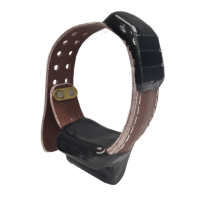
Procedure for adjusting and attaching the collar to an animal for optimal fit.
The L20 Solar-Cell Tracker is a lightweight, solar-rechargeable, LTE-M Cellular enabled GPS tracking device designed for use in longer studies, offering extended life due to its rechargeability. Its primary function is to acquire GPS locations using an onboard modem and then transmit these locations over LTE-M cellular networks to a cloud database. Both data access and device configuration are managed by the user through a web browser interface.
The attachment method varies by model:

 To Next Page
 General