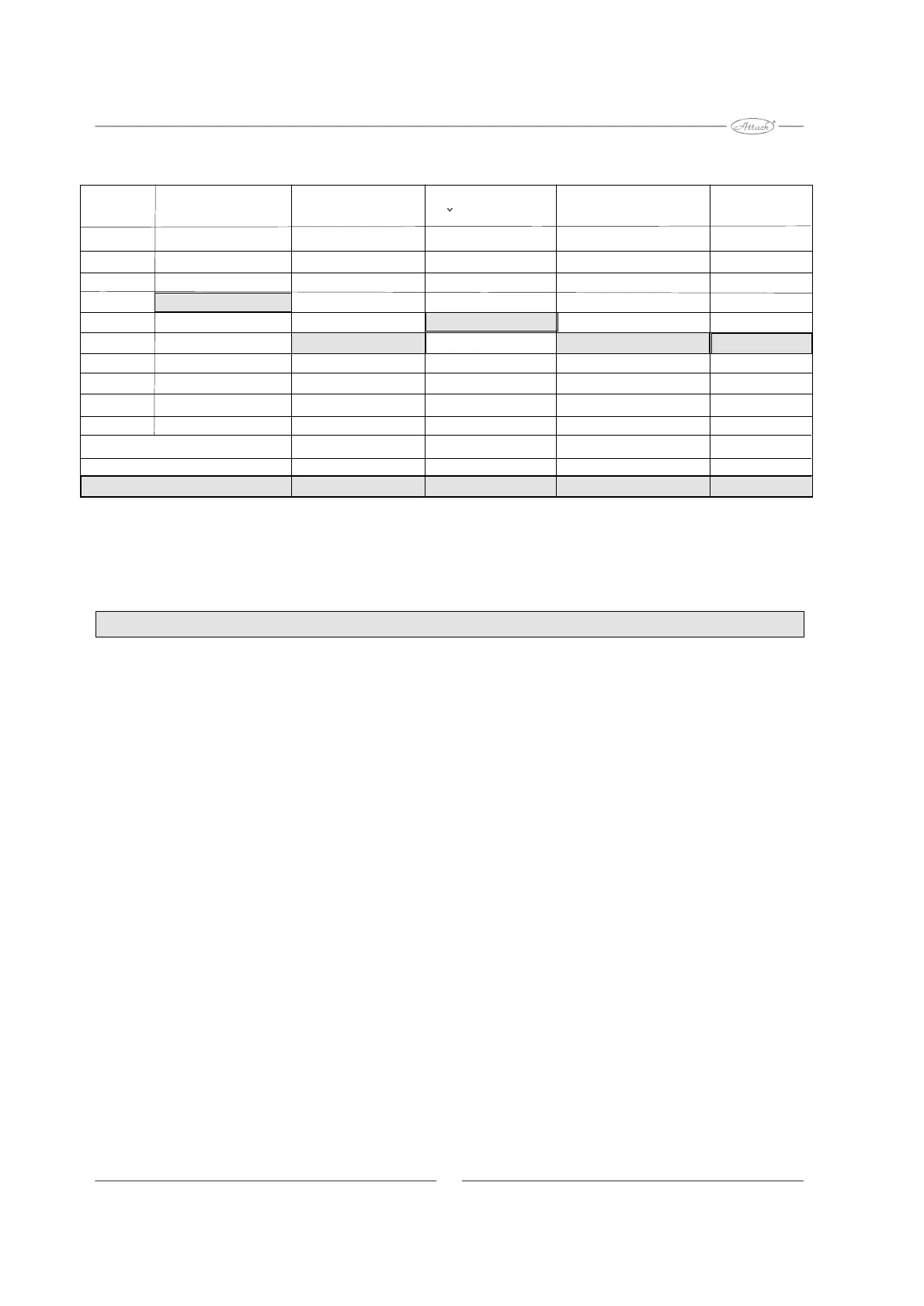
Tabel of settings
Tabel applicable only for control boards marked by green point.
If the appliance does not work properly:
- Check the level of pellets. The openings should be covered with pellets
during the operation mode.
-In too high level of pellets, enhance the air inlet by opening the ventilator flap, or
(changing P2) reduce the pellet feeding.
-Check the flue gas temperature (usually it moves between 120 and 170 °C). If
the temperature is too high: reduce the pellet feeding on P2. If the temperature is
too low: enhance the air inlet by ventilator flap.
-In too low fuel level in burner check the flue gas temperature so, as described
above and close the air inlet, or enhance the pellet feeding. (P2).
-Pellet feeding to be changed by P2 on control board (increase by clockwise
rotation, decrease by anticlockwise rotation). Check also the air inlet flap and the
flue gas temperature.
Burner settings
ALLERT: To keep the warranty and to reach the optimum combustion use the
flue gas analyzer in settings.
Pot.1Pot.2Pot.3Pot.4Pot.5
BlinkingFuel ignitionFeeding cycle Burning out timeTransitional intervalPhotocell
0x30 sec1,5 sec30 sec45 sec0
1x45 sec1,65 sec60 sec90 sec1
2x60 sec1,82 sec90 sec135 sec2
3x75 sec2,18 sec120 sec180 sec3
4x90 sec2,83 sec150 sec225 sec4
5x10⁵ sec3,68 sec180 sec270 sec5
6x120 sec4,79 sec210 sec315 sec6
7x135 sec6,22 sec240 sec360 sec7
8x150 sec7,46 sec270 sec405 sec8
9x165 sec8,21 sec300 sec450 sec9
Factory settings
75 sec3,68 sec150 sec270 sec5
8


 To Next Page
 Loading...