£.Atwood
·
By
~Kidde
SINGLE STATION
CA
RBON
MONOXIDE ALARM ALSO
SUI
TA
BLE
F
OR
US
E
IN
RECREATIONAL VEHICLES
Carbon
Monoxide
Alar
m
User Guide
Models:
900-0143-LPM
and
900-0140-LPM
(with
Digital Display)
900-0140
-
LPM
KN-COPP-8-
LPM
wit
h
Dig
ital
Display
900-0143-LPM
KN-C08
-
8-LPM
AA
B
atte
ry Operated
ATIENTION: Please
take
a
few
minutes
to
thoro
u
ghly
r
ea
d
th
is user
guide
w hi
ch
should
be saved
for
future
r
efe
ren
ce
and
passed on
to
any
subsequent
owner.
Manual
PIN
2529-7220-00
Re
v A
3.
Installation
Locations
Locatio
ns
To
A
vo
id
IMPORTANT:
Im
proper location
can
affect the
sens
itive electronic
components in this ala
rm.
To
avo
id
caus
ing damage to the unit, to provide
optimum performance, and to prevent
unnecessary
nuisance
alarm
s:
•
Do
not install
in
kitchen
s,
ga
r
ages
or furnace rooms that m
ay
ex
pose
t
he
sen
sor to subs
ta
nces
that
co
ul
d damage or contaminate i
t.
•
Do
not i
nsta
ll
in
a
re
as
where the temperature
is
col
d
er
than 4.4°C
(40°F) or h
ott
er
th
an
37.8°C (100
°F)
such
as
crawl
spa
ce
s,
attic
s,
porches and garages.
•
Do
not i
nsta
ll
within 5 ft.
of
heating
or
cooking applia
nces.
(K
idde
recommends
15
ft. to prevent nu
is
a
nce
ala
r
ms).
• Do not
in
sta
ll
near
ven
t
s,
flu
es
, chimne
ys
or any
fo
r
ce
d/un
fo
rced air
ventilation o
pe
ning
s.
•
Do
not install near
cei
ling fans, doors, windows or
areas
direct
ly
exposed
to
the weather.
• Do not insta
ll
in dead
ai
r
spaces,
suc
h
as
peaks
of
vaul
t
ed
ce
i
li
n
gs
or
gabled roofs,
wh
ere
CO
may not
re
ach the
senso
r in ti
me
to
provide
ear
ly
warning.
•
Do
not
in
st
all
th
is
unit
nea
r deep-
ce
ll
lar
ge
batter
ies.
La
rge
ba
tt
eries
ha
ve
em
i
ssion
s that
can
ca
use
the a
la
rm to perfo
rm
at l
ess
than
optimum performance.
•
Do
not obstruct the vents located on t
he
alarm.
Do
not place the
al
arm wh
ere
drape
s,
fu
rn
iture or oth
er
obj
ects
bl
ock t
he
flow
of air
to the vents.
Carbon
Monoxide
Alarm
Procedure
A
WARNING:
Act1vat1on
of the
co
Alarm
indicates
the
presence
of
Carbon
Monoxide
(CO)
which
can
kill
you.
If
alarm s
ounds
4
qu
ick beeps, 5 seconds
off:
1) Immediately move
to
fresh air - outdoors or by
an
open
door
/w
indow.
Do
a head
cou
nt
to check that a
ll
pers
o
ns
are
ac
co
unted for.
Do
n
ot
re-enter t
he
prem
ises
nor move aw
ay
from the open door/window u
nt
il
the emergen
cy
serv
i
ces
responders
have
arrived, the pr
emis
es
have
been
aired
out
, and
your
ala
rm r
em
ains
in
its normal
con
dition.
2) Call your
em
ergen
cy
services
(Fire Department or
91
1
);
I
PHONE
NUMBER:
Never
r
estart
the
source
of
a
CO
problem
unti
l
it
has been
corrected.
Never
ignore
the
sound
of
the
alarm!
If
the
alarm
is
sounding,
pressing
the
test
/reset
button
will
terminate
the
alarm.
If
the
CO
condition
that
caused
the
alert
in
the
first
place
continues,
the
alarm
will
reactivate.
If
the
unit
alarms
again
within
six
minutes,
it
is
sensing
high
levels
of
CO
which
can
quickly
become a
dangerous
situation.
4.
Installation
Instructions
Battery
Installation
and
Replacement
To
install
or
re
p
lace
the batteries
in
t
hi
s
Ki
dde
CO
alarm,
please
perform
the following steps.
1.
Slide
open the bottom mtg plate
to
expose the battery compartment.
2. If replacing batt
eri
es,
remove the old
ba
tte
ries
and prope
rl
y disp
ose
of
them
as
recomm
en
d
ed
by
the
ba
tt
ery
m
an
ufacturer.
3.
In
sta
ll the new batteries. Note the polarity
illustration in the battery compartment.
4.
Close the bottom mtg plate. Note:
The
bottom mtg plate will not
close
if
all
three AA batteries
are
not instal
le
d.
When replacing the ba
tt
eri
es,
use
one
of
the following approved brands:
• Duracell
MN1500
or
MX1500
• Energizer
E91
• Gold Peak 1 SA
•
Golden
Power
GLR6A
Battery
Polarity
for
the
three
AA
batteries
Th
ese
batteri
es
ca
n be pur
chased
where
yo
u boug
ht
the
ala
rm
or at a
local
ha
rdware store.
Use
of a di
ff
erent battery may
have
a detrimental
e
ff
ect on the alarm operation.
IMPORTANT: Constant exposur
es
to
high or
low
humidity may reduce
battery life. A good safety
meas
u
re
is
to
re
pl
ace
the battery at least
once a
yea
r, or at the
same
time
as
you change your clocks for
dayl
i
ght
sav
ing ti
me.
A
fte
r installing or changing the batter
ie
s,
rein
sta
ll your alarm. T
est
yo
ur alarm
by
using the Test/Reset button and check that the gr
een
" Power" L
ED
is on.

 Need help?
 General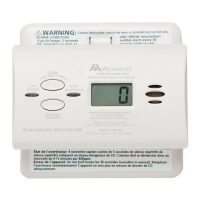

 To Next Page
