EasyManua.ls Logo

Au3Tech SC1000 - 2 Operations; 2.1 Quick actions

Default Icon
25 pages
Print Icon
To Next Page IconTo Next Page
To Previous Page IconTo Previous Page
Loading...
WUHAN AU3TECH TRADING CO., LTD
MCC3721H User’s Quick Setup V1.02
9
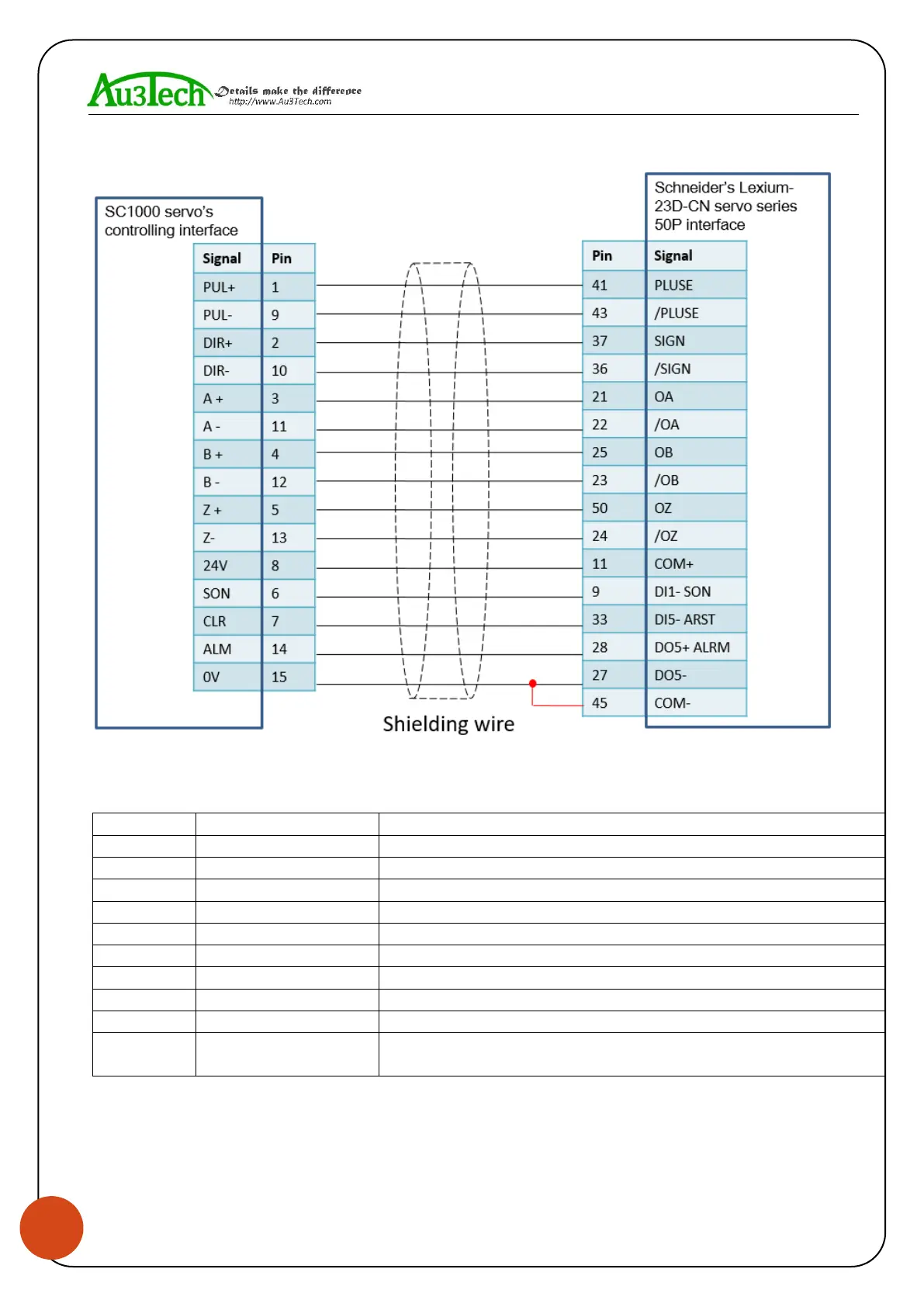
Schneider’s Lexium-23D-CN servo series wiring diagram shows as below:
The basic parameter settings of Schneider’s Lexium-23D-CN servo series
shows as below.
Parameter
Set value
Meaning
P1-00
0002
Choose the pulse mode
P1-01
0000
Position mode
P2-00
Factory default :35
Position controls proportional gain and adjust accordingly.
P2-10
101
Set DI1 port as servo on
P2-14
102
Set DI5 port as alarm clear
P2-15
0000
Set DI6 port as null
P2-16
0000
Set DI7port as null
P2-17
0000
Set DI8 port as null
P2-22
0007
Set DO5 port as servo alarm
P2-68
0001
When L1/L2 and SON are valid at the same time, motor
works. (If not set this parameter, motor can’t work.)

Other manuals for Au3Tech SC1000

Related product manuals