When you enter blood pressure mode, the KERi will begin measuring
your blood pressure. This can take up to a minute. Once finished, the
KERi will vibrate and display the measurement.
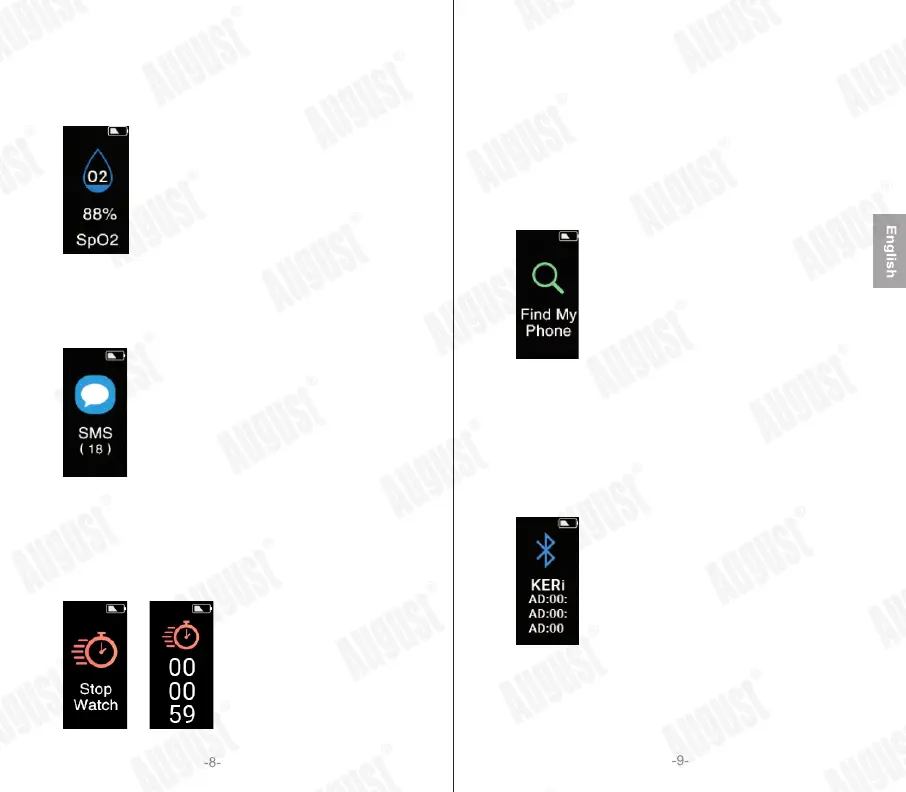
5.1.7Blood Oxygen
Blood Oxygen Level
When you enter blood oxygen mode, the KERi will begin measuring
your blood oxygen level. This can take up to a minute. Once finished,
the KERi will vibrate and display the measurement.
5.1.8Messages
When you enter Messages mode, the KERi will show a summary of the
messages on your phone. Press and hold the touch button for 5 seconds,
and the KERi will show details of the messages. Then, press the button
to switch the messages.
5.1.9Stopwatch
Minutes
Seconds
Milliseconds
Press and hold the touch button for 5 seconds to start the stopwatch.
Press the touch button to pause or resume the stopwatch.
When paused, press and then hold the touch button for 5 seconds to
return to the main menu.
Note: the maximum time the stopwatch can last is 99minutes
(1hour and 39 minutes). Once this time is passed, the stopwatch will
restart at 00’00’’00’’’.
5.1.10Find Device
Find My Phone
Press and hold the touch button for 5 seconds to activate the ‘Find My
Phone’ function. The paired device will ring or vibrate depending on its
settings, allowing you to locate it.
Note: the paired device needs to be within Bluetooth range in order to
be found (10m). If you are not able to hear the device, try moving to
another room and activating the function again.
5.1.11KERi Information
KERi’s MAC information
The KERi Information section provides you with a unique identifier for
the wristband. This is useful if you are pairing the wristband when there
are multiple KERis nearby.


 To Next Page