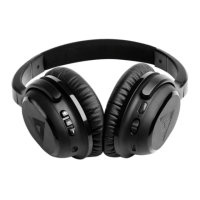
OVERVIEW
Active Noise
Cancelling
on/o switch
USB charging
port
Active Noise
Cancelling
indicator LED
Auxiliary cable
port
Headphone
controls
Power
indicator LED
Power
on/o switch
2. DOWNLOAD OUR APP
Download the Audeara app from
Play Store (Android users) or
App Store (Apple users).
5. PERSONALISE YOUR HEADPHONES
Once your headphones are paired,
open the Audeara app and follow the
onscreen instructions to personalise
your headphones to your unique
hearing proile.
Personalisation needs power. When
powered on your headphones will be
personalised in Bluetooth or wired
mode. If you run out of battery, you can
turn them o and use them in normal
wired mode.
We love to hear your feedback and we are here to help.
Head to audeara.com/support to get in contact with us.
SUPPORT & FEEDBACK
4. PAIR WITH YOUR DEVICE
For iOS devices:
tap Settings > Bluetooth.
For Android devices:
tap Settings > Connections > Bluetooth.
Make sure Bluetooth is turned on.
Your phone or tablet will show all
available nearby Bluetooth devices.
If you have placed your headphones in
discovery mode, they should appear in
the list as “Audeara A01”. If you don’t
see them, refer to the previous page.
Tap on “Audeara A01” to pair.
Upon successful pairing, the power
LED indicator will stop lashing and
remain blue.


 To Next Page