Digiplexer 246 v2.5.x User Manual – 11/2010
Page 79
Head Office : Parc d’activites Kennedy - 20, avenue Neil Armstrong – F-33700 Bordeaux-Merignac (France)
Tel +33 (0)5 57 928 928 – Fax +33 (0)5 57 928 929 – contact@audemat.com – www.audemat.com
8.2.5. Parameters 8.2.5. Parameters
Select the corresponding tab. Select the corresponding tab.
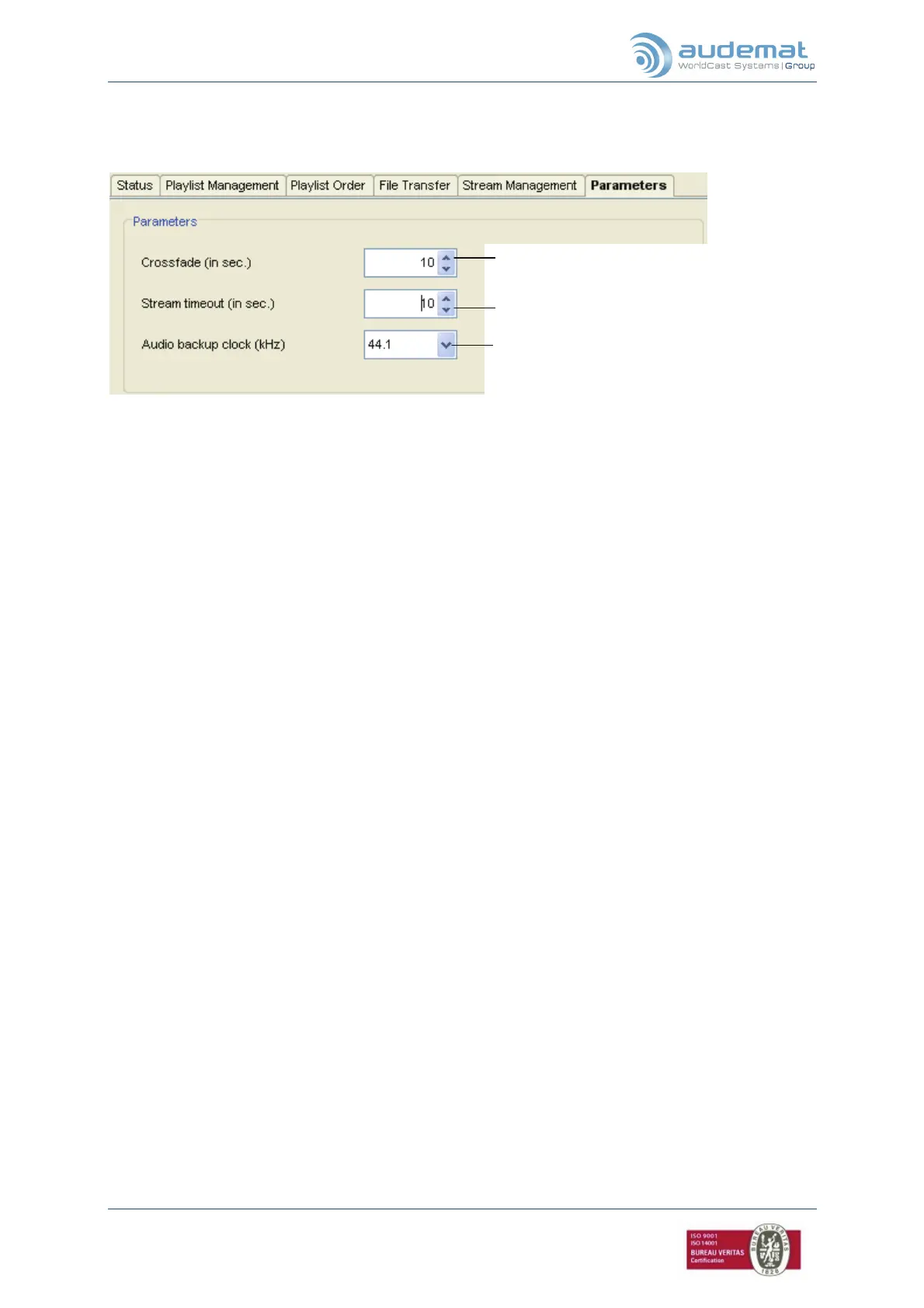
The crossfade can only be applied if its duration is no longer than half the duration of the audio files.
Set the duration of the crossfade between
two pieces in seconds.
Set the stream timeout in seconds.
Set the sampling frequency. Choose 44.1 or
48 depending on your audio backup files.
We recommend using the same sampling
frequency for all audio files. If that is not the
case, set the most commonly used sampling
frequency.


 To Next Page