Digiplexer 246 v2.5.x User Manual – 11/2010
Page 85
Head Office : Parc d’activites Kennedy - 20, avenue Neil Armstrong – F-33700 Bordeaux-Merignac (France)
Tel +33 (0)5 57 928 928 – Fax +33 (0)5 57 928 929 – contact@audemat.com – www.audemat.com
A.2. Upgrade to 2 or 4 bands
First contact the sales department to get a copy of the CD containing the upgrade files. Follow then
the procedure:
Note: file names vary whether the upgrade is in 2 or 4 bands (number symbolized by n in file names
below).
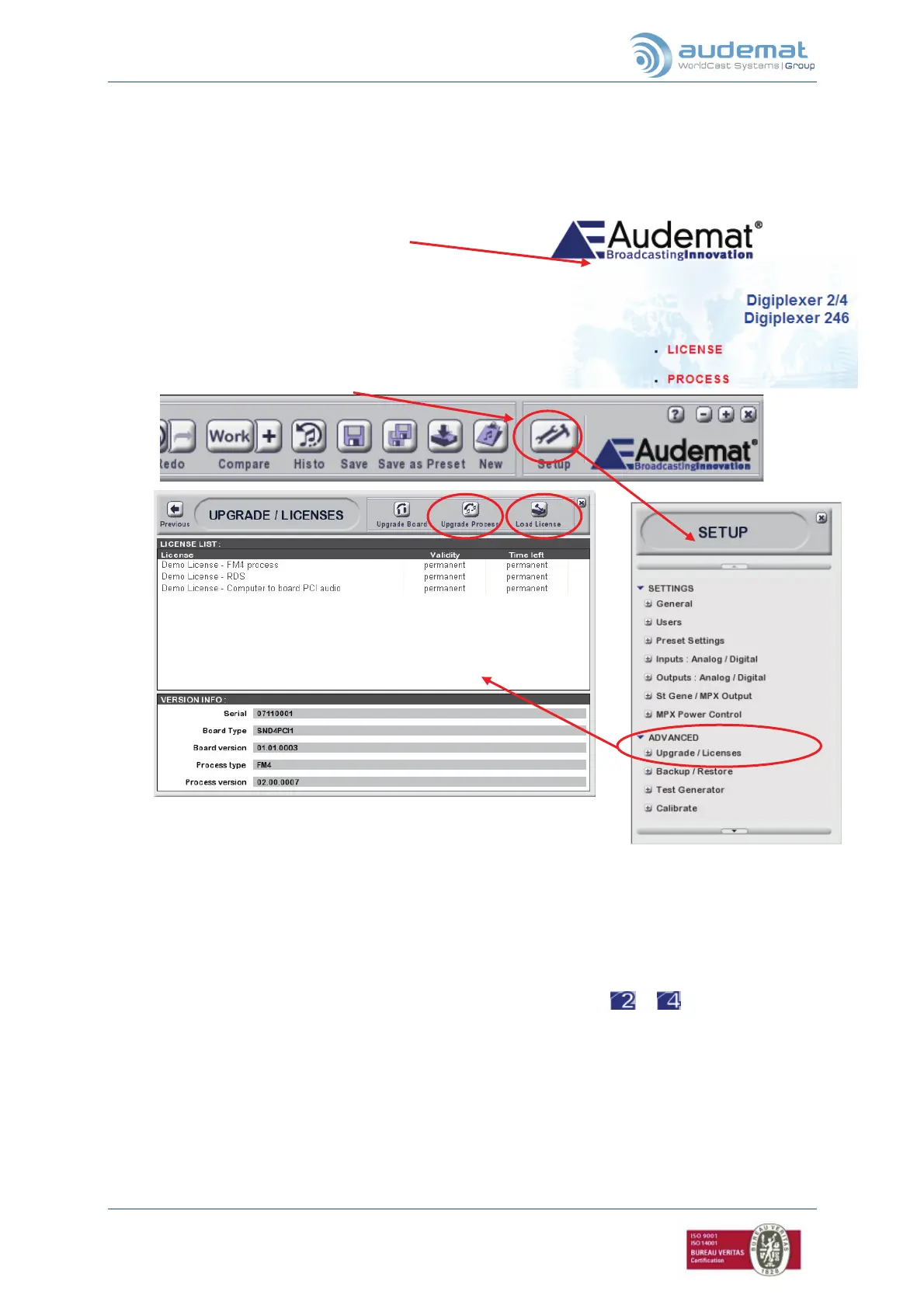
1. Insert the Audemat CD-Rom; the following screen
will appear :
2. Right mouse click on “License” to save the target
‘license FMn.lic’ and on “Process” to save the
target ‘Process FMn.s4s’ on your PC.
3. Open the Digiplexer Sound Process application.
4. Connect to the equipment you wish to upgrade
5. Click on the “Setup” button.
6. Click on “Advanced” and “Upgrade / Licenses”.
7. Click on the “Load License” button (1).
8. Select the previously saved ‘license FMn.lic’ file, and open it.
9. Click on the “Upgrade Process” button (2).
10. Select the previously saved ‘Process FMn.s4s’ file, and open it.
11. Wait for a few seconds: a message will be displayed to indicate the upgrade process is
validated.
12. Click on ‘OK’ to restart the application in 2- or 4-band mode.
A new logo shows the process has been successfully upgraded:
or .
12


 To Next Page