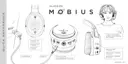
10
Mobius User Manual Rev. 1, Date: 2018-0525 Ampacs Corporation Confidential
When connected and playing media:
- Perform a short press of the power button to pause/play music.
- Perform a short press and scroll the volume wheel to go to the next or previous song.
- Perform a short press and scroll the mic-gain wheel to change the EQ presets within Mobius.
The following EQ presets are available:
This is the EQ preset that is tuned to the Audeze House curve.
This enhances footsteps to better hear those sneaking behind you.
Some might say it’s audio radar.
Enhances gunshots and other ballistic sounds so you can clearly pinpoint
the enemy in FPS games and take advantage.
This preset is made especially for music and jamming between intergalactic locations.
Activate those warp drives. This preset is designed for racing.
This preset is optimized for role playing games and immersion.
No EQ. You can use this if you are planning to use external EQ options.


 To Next Page