94 On the road
Cruise control
Switching the system on
The cruise control system makes it possible to
drive at a constant speed starting at 20 mph
(30 km/h) .
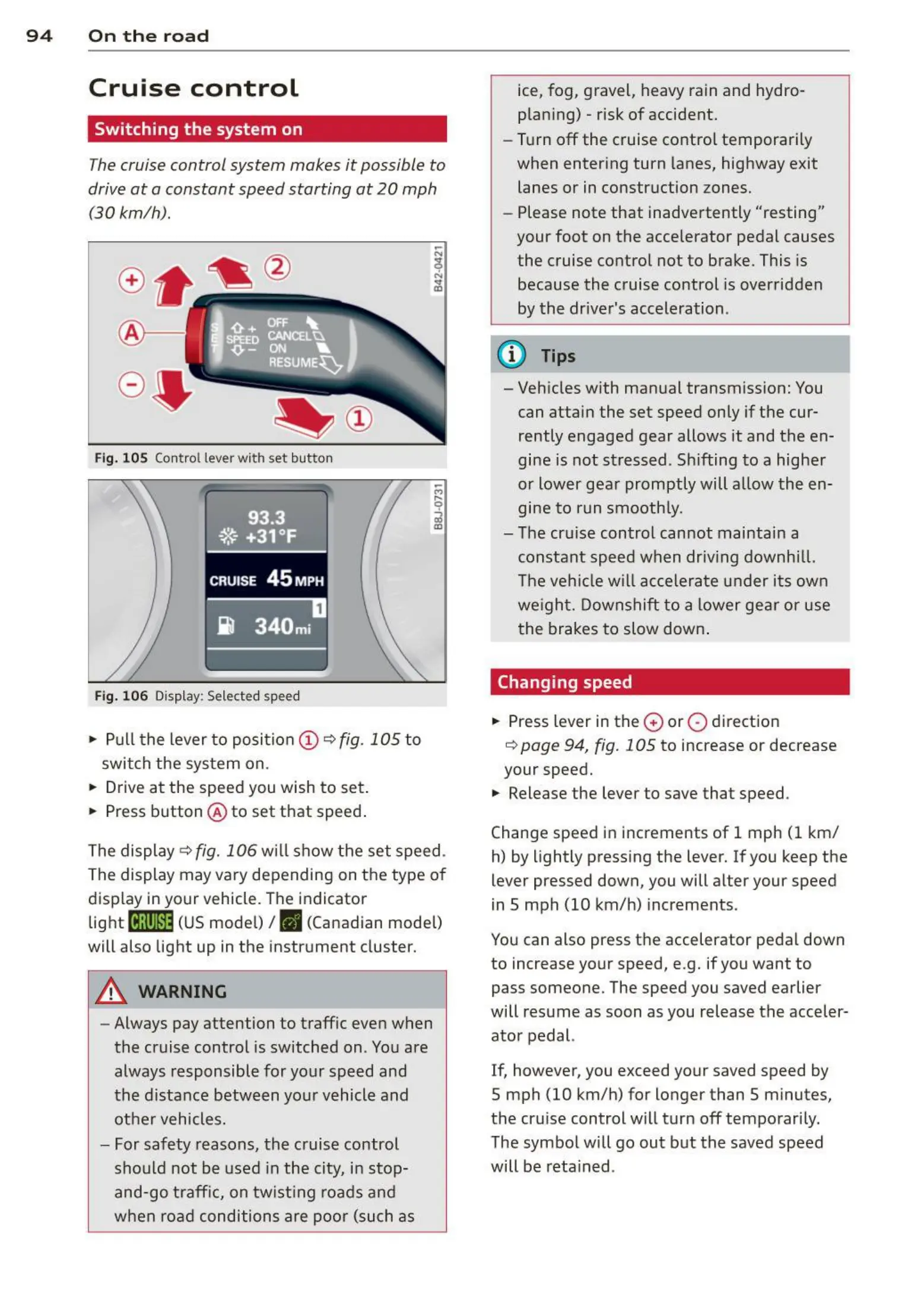
Fig. 105 Control lever with set button
Fig. 106 Display: Selected speed
• Pull t he lever to position (D ¢ fig . 105 to
switch the system on.
• Drive at the speed you wish to set .
• Press button @ to set that speed .
The display
¢fig. 106 will show th e set speed .
The display may vary depending on t he type of
display in your vehicle. The indicator
light
[ifj11)~1~ (US mode l) I. (Canadian mode l)
will also light up in the instrument cluster.
A WARNING
- Always pay attention to traffic even when
the cruise control is switched on . You are
always responsible for your speed and
the distance between your vehicle and
othe r vehicles .
- For safety reasons, the cruise control
sho uld not be used in the city, in stop-
and -go traff ic, on twist ing roads and
when road conditions are poo r (such as
ice, fog, gravel, heavy rain and hydro-
plan ing) - risk of accident.
- Turn off the cruise contro l temporarily
when enter ing turn lanes, highway exit
lanes or in construction zones.
- Please note that inadvertently "resting"
your foot on the accelerator pedal causes
the cruise control not to brake. This is
because the cruise control is over ridden
by the driver's acceleration.
(D Tips
- Vehicles with man ual transmiss ion: You
can attai n the set speed only if the cur-
rently engaged gear allows it and the en-
gine is not stressed . Shifting to a highe r
or lower gea r promptly will allow the en-
gine to run smooth ly.
- The cruise control can not mainta in a
constant speed when driving downhi ll.
The vehi cle will accele rate under it s own
weight. Downshift to a lower gear or use
the brakes to slow down .
Changing speed
• Press lever in the 0 or 0 direct ion
¢ page 94, fig. 105 to increase or decrease
your speed.
• Release the lever to save that speed .
Change speed in increments of 1 mph (1 km/
h) by lightly pressing the lever. If you keep the
lever pressed down, you will alter your speed
in S mph (10 km/h) increments.
You can also press the accelerator pedal down
to increase your speed, e.g. if you want to
pass someone. The speed you saved earlier
will resume as soon as you release the acceler-
ator pedal.
If, however , you exceed your saved speed by
5 mph (10 km/h) for longer than 5 minutes,
the cruise control will turn off temporari ly.
The symbo l will go out but the saved speed
will be reta ined .



 To Next Page