EasyManua.ls Logo

Audi A7 2023 - Page 175

Audi A7 2023
332 pages
Print Icon
To Next Page IconTo Next Page
To Previous Page IconTo Previous Page
Loading...
4K80127218K
Parking
and
maneuvering
Driving
into
parking
spaces
—
Parallel
parking
on
the
left
or
right
side
of
the
street
@
©
page
165,
fig.
117
=
Driving
forward
or
backing
into
perpendicular
parking
spaces
@/@)
>
page
165,
fig.
117.
Exiting
parking
spaces
—
Exiting
perpendicular
parking
spaces
@)
>
page
166,
fig.
118.
—
Exiting
parallel
parking
spaces
@).
Observe
the
safety
precautions
and
note
the
limits
of
the
assist
systems,
sensors,
and
cameras
®
page
119.
Parking
with
the
myAudi
app”)
Applies
to:
vehicles
with
remote
park
assist
plus
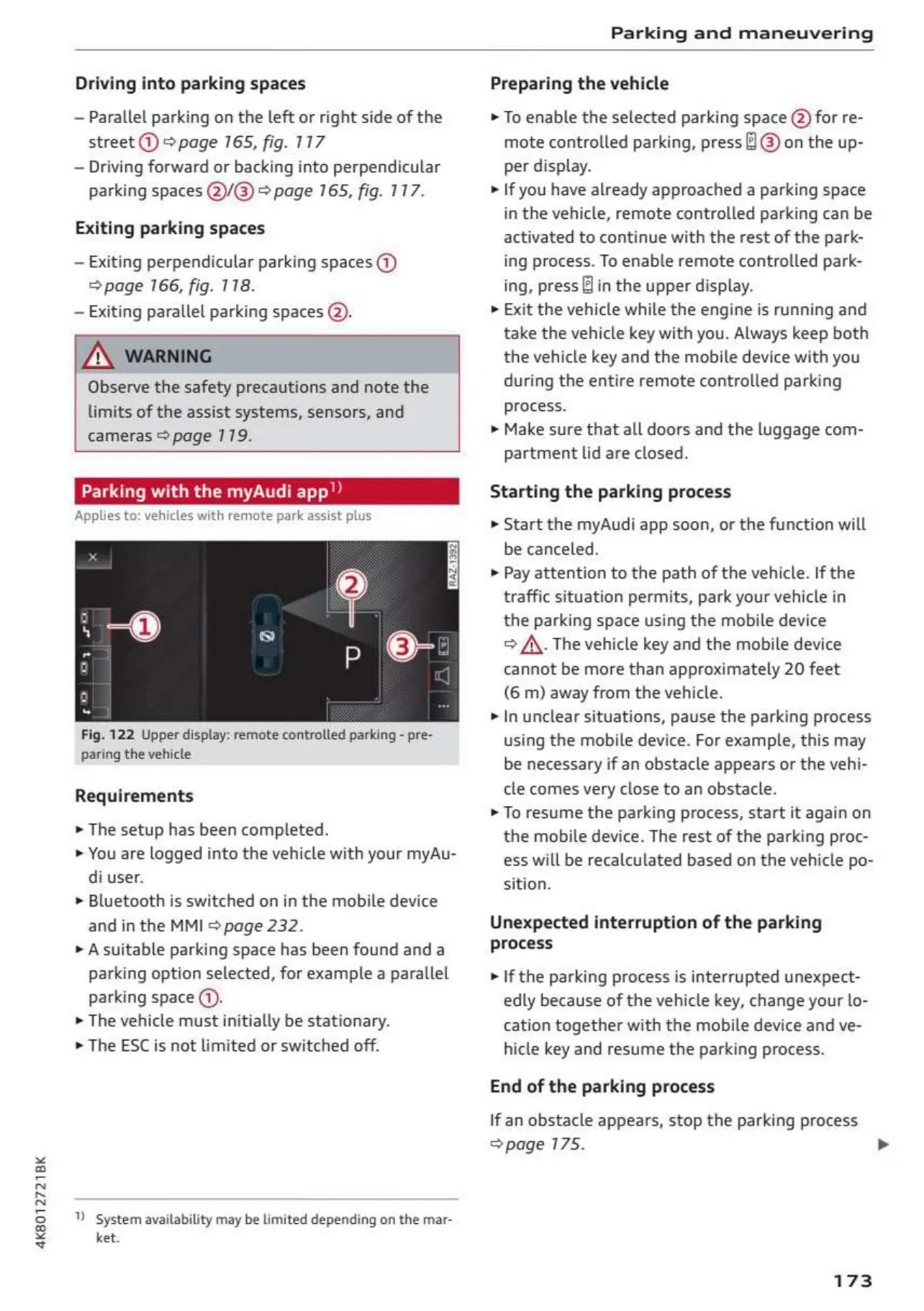
Fig.
122
Upper
display:
remote
controlled
parking
-
pre-
paring
the
vehicle
Requirements
»
The
setup
has
been
completed.
»
You
are
logged
into
the
vehicle with
your
myAu-
di
user.
»
Bluetooth
is
switched
on
in
the
mobile
device
and
in
the
MMI
>
page
232.
»
A
suitable
parking space
has
been
found
and
a
parking
option
selected,
for
example
a
parallel
parking
space
@).
»
The
vehicle
must
initially
be
stationary.
»
The ESC
is
not
limited
or
switched
off.
System
availability
may
be
limited
depending
on
the
mar-
ket.
Preparing
the
vehicle
»
To
enable
the
selected
parking
space
@)
for
re-
mote
controlled
parking,
press
&]
@
on
the up-
per
display.
»
If
you
have
already
approached
a
parking space
in
the
vehicle,
remote
controlled
parking
can
be
activated
to
continue
with
the
rest
of
the
park-
ing
process.
To
enable
remote
controlled
park-
ing,
press
Jin
the
upper
display.
»
Exit
the
vehicle
while
the
engine
is
running
and
take
the
vehicle
key
with
you.
Always
keep
both
the
vehicle
key
and
the
mobile
device
with
you
during
the
entire
remote
controlled
parking
process.
»
Make
sure that
all
doors
and
the
luggage com-
partment
lid
are
closed.
Starting
the
parking
process
»
Start
the
myAudi
app
soon,
or
the
function
will
be
canceled.
»
Pay
attention
to
the
path
of
the
vehicle.
If
the
traffic
situation
permits,
park
your
vehicle
in
the
parking
space
using
the
mobile
device
©
A\.
The
vehicle
key
and
the
mobile
device
cannot
be
more
than
approximately
20
feet
(6
m)
away
from
the
vehicle.
»
In
unclear
situations,
pause
the
parking process
using
the
mobile
device.
For
example,
this
may
be
necessary
if
an
obstacle
appears
or
the
vehi-
cle
comes
very
close
to
an
obstacle.
»
To
resume
the
parking
process,
start
it
again
on
the
mobile
device.
The
rest
of
the
parking
proc-
ess
will
be
recalculated
based
on
the
vehicle
po-
sition.
Unexpected
interruption
of
the
parking
process
»
If
the
parking process
is
interrupted
unexpect-
edly
because
of
the
vehicle
key,
change
your
lo-
cation
together
with
the
mobile
device
and
ve-
hicle
key
and
resume
the
parking
process.
End
of
the
parking
process
If
an
obstacle
appears,
stop
the
parking
process
<page
175.
>
173

Table of Contents