Need help?
Do you have a question about the Audiolab 7000N Play and is the answer not in the manual?
Compliance statement regarding digital device interference and FCC rules.
Canadian regulatory compliance for license-exempt transmitters and receivers.
Details on meeting general RF exposure requirements and minimum usage distance.
Information on AirPlay 2 support for controlling audio systems with Apple devices.
Overview of the 7000N Play's wireless audio streaming capabilities and features.
Lists core hardware and software features of the 7000N Play.
Details the audio input and output connections available on the 7000N Play.
Instructions for safely unpacking the device and checking the carton contents.
Advice on positioning the unit on a stable surface and checking power requirements.
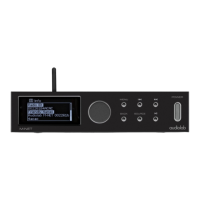
Identifies buttons, display, and LED indicators on the front of the 7000N Play.
Details the various input and output ports located on the rear of the 7000N Play.
Instructions for inserting and replacing batteries in the remote control.
Explains how to use the remote handset effectively with the 7000N Play.
Covers USB firmware updates and the USB control interface for amplifier integration.
Details mains power, 12V trigger, and Ethernet network connections.
Explains the digital coaxial, optical, and analogue stereo outputs for audio.
Explains the different digital filter options for audio tuning.
How to set volume limits, output mode, and audio balance.
Options for customizing the front panel display, like home screen.
Options for brightness, display timeout, animation, trigger, language, standby, and reset.
How to check the current operational firmware version.
Guidelines for switching the 7000N Play on and off, and entering standby mode.
How to store and play internet radio stations using preset buttons.
Instructions for streaming audio from Apple devices using AirPlay 2.
How to navigate the menu to change front panel display settings.
Details the core capabilities of DTS Play-Fi technology.
Explains Wireless Surround Sound, Portable Listening, A/V Sync, Easy Setup, and Hi-Res Audio.
Information on where to download the DTS Play-Fi application for various platforms.
Instructions for connecting the 7000N Play via wired Ethernet or wireless Wi-Fi.
Step-by-step instructions for connecting iOS devices via the Play-Fi app.
Step-by-step instructions for connecting Android devices via the Play-Fi app.
Guide to setting up Wi-Fi using a web browser on Windows PC or Mac.
How to select and group devices for streaming within the DTS Play-Fi app.
Lists and describes various music streaming services compatible with DTS Play-Fi.
Creating multi-room speaker groups and Spotify groups for synchronized playback.
Information on automatic system updates, troubleshooting, and checking app/system versions.
Steps for registering the product to qualify for the extended warranty.
Lists items and conditions not covered by the Audiolab warranty.
How to claim warranty service, including packaging and return procedures.
Contact details and address for technical support and service centers.
Details on power consumption, dimensions, weight, finish, and accessories.
Technical details on digital outputs, sampling rates, and impedance.
Technical specifications for the Digital-to-Analogue Converter, including frequency response and THD.
 General
| Type | Network Audio Player |
|---|---|
| Wi-Fi | Yes |
| Remote Control | Yes |
| Streaming Services | Tidal, Qobuz, Deezer, Spotify |
| Connectivity | Ethernet |
| DAC | ESS Sabre ES9038Q2M |
| Outputs | RCA, XLR, Optical, Coaxial |
| File Formats | FLAC, ALAC, WAV, AIFF, MP3, AAC, WMA |
| Multiroom | Yes |
| Inputs | USB |
| Display | LCD |
| Bluetooth | Yes (aptX HD) |

 To Next Page