4: Remote Handset
Page 4
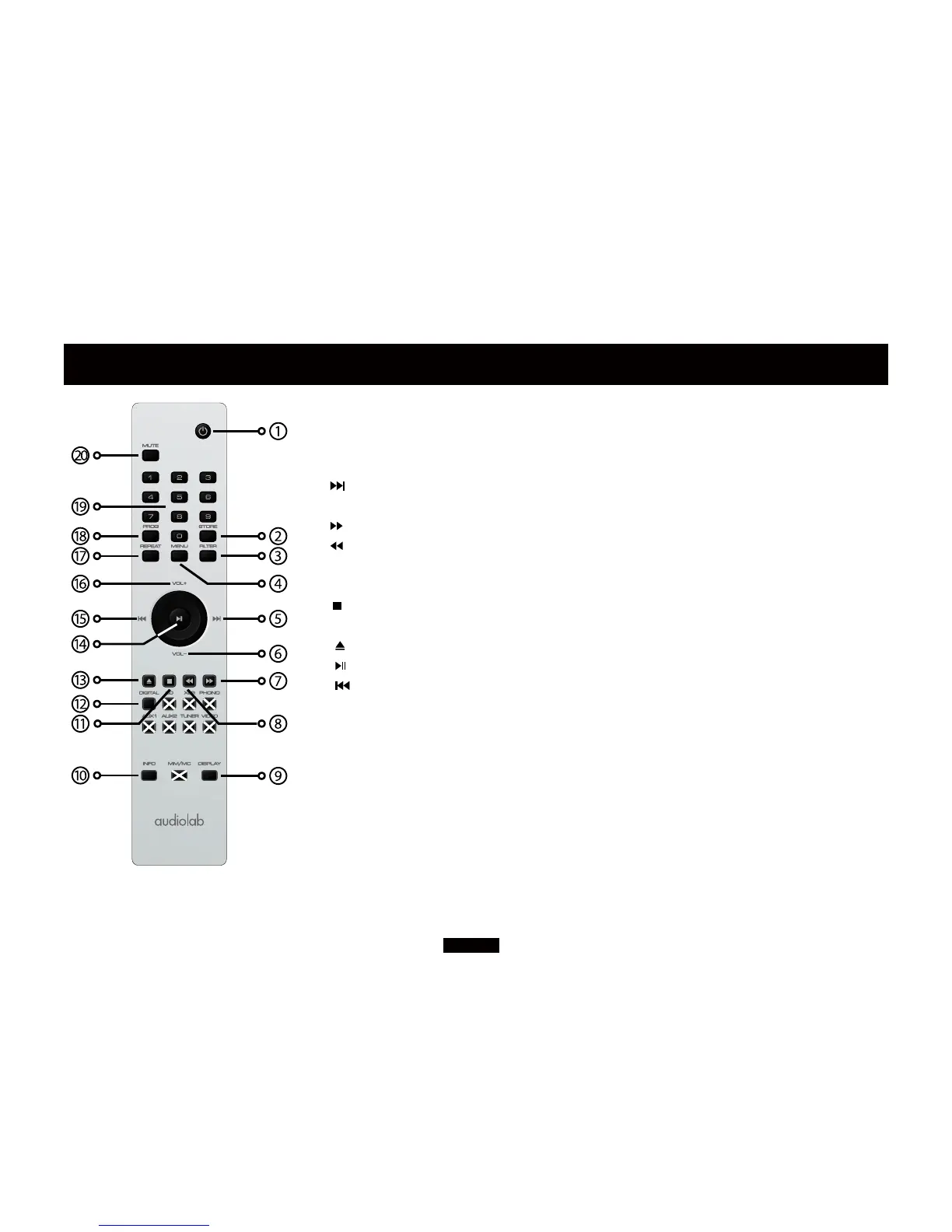
NOTE: the handset buttons shown crossed out are for use with other
Audiolab units and are not operational when used with the 8300CD
1 STANDBY Press to bring the unit in/out of Standby
2 STORE Press to store a track in Program mode
3 FILTER Select a digital filter
4 MENU Press to enter menu mode
5 Move to the next track of CD/USB
6 VOL– Decrease Volume
7 Press and hold to Fast Forward
8 Press and hold to Fast Reverse
9 DISPLAY Press to cycle through the display brightness levels
10 INFO Press to toggle track name or artist name
11 Press to stop CD
12 DIGITAL Press to toggle different digital input
13 Press to eject/load the disc
14 Press to start/pause CD/USB playback
15 Press once to replay the current track of CD/USB
Press again to move to the previous track of CD/USB
16 REPEAT Press to select a repeat mode
17 VOL+ Increase Volume
18 PROG Press to program tracks of your choice
19 NUMBER KEYS Press to go directly to a track by number
20 MUTE Press to mute and unmute the sound
Fitting Batteries
Open the cover, unwrap the supplied AAA batteries and
place them in the battery compartment with the polarity as
shown, replace the cover.
Always use AAA batteries and always replace them in sets.
Never mix old and new batteries. Very weak batteries can
leak and damage the handset. Replace them in good time!
There is a risk of fire and burns if a battery is handled
improperly. Do not disassemble, crush, puncture, short
external contacts, or dispose of in fire or water.
Do not attempt to open or service a battery. Discard used
batteries in full accordance with recycling regulations in
force in your area.
Handset Operation
The handset operates several Audiolab components. The
handset buttons shown crossed out are for use with other
Audiolab units and are not operational when used with the
8300CD.
Point the handset at the remote receiver and press the
relevant key. The handset should be within 15 meters of the
player and there must be a clear line of sight between the
two units.



 To Next Page