- 12 -
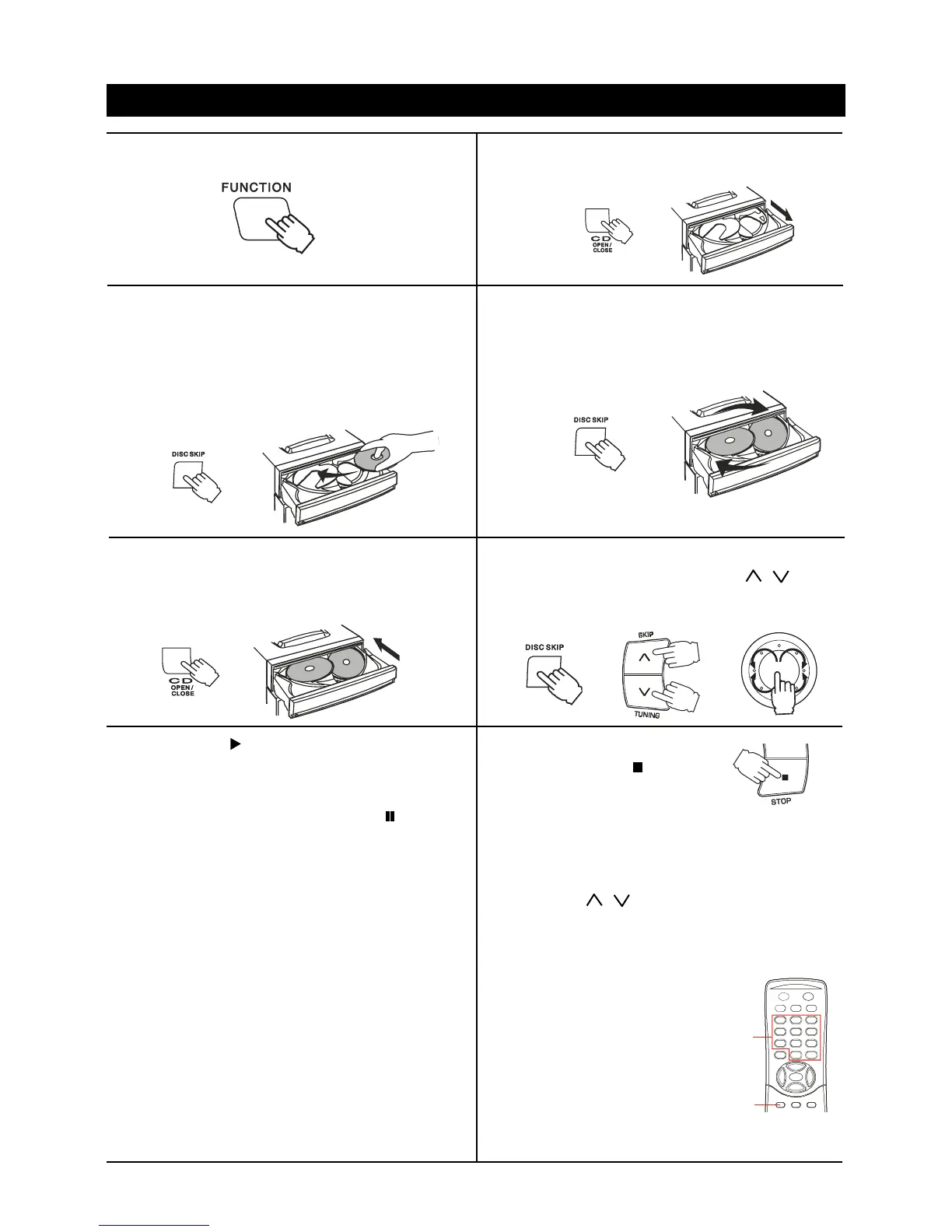
1. Press the FUNCTION button to CD.
2. Press the CD OPEN/CLOSE button to open
the disc tray.
7. Press the PLAY button to
start playback.
To interrupt playback
Press the II PAUSE/SET button and ' ' will be
displayed. Press this button again to resume
playing.
8. To stop playing:
Press the STOP button.
5.Press the CD OPEN/CLOSE button to close
the tray.
It takes a short while for your player to check
the discs.
3. Place the first disc onto the disc holder, with the
label side up. Press the DISC SKIP button to
revolve the tray clockwise. Place other disc(s)
on the disc holder(s).
Caution: The unit can play 12cm (5") only.
Do not stack CDs in the tray. This can damage
the player and CDs.
4. Press the DISC SKIP button to revolve the tray
clockwise.
Place other disc(s) on the disc holder(s).
6. Press the DISC SKIP button to select the desired
disc. Press either one of the SKIP / buttons
to select the desired track. The selected disc
symbol will flash.
COMPACT DISC OPERATION
Notes
1. During playback, disc tray can be opened to
change/add disc, but the DISC SKIP button will
become invalid and the current disc playback will
not be interrupted.
2. The SKIP / buttons can only be used to
choose a track of the current disc. To choose a
track of another disc, the DISC SKIP button
should be pressed to get to the desired disc first.
Disc number selection
Hold the SHIFT and press the
numbered buttons 1-5 to
select which disc for playback.
Example:
Hold the SHIFT and press the
numbered buttons 3 to select disc 3 for playback.
Notes
Playback will begin from first track on the disc you
have selected to play.
After the disc finishes playing, the next disc will
automatically play.
When there is no CD in one of the disc 1-5
position, that position will be skipped and the next
CD will be played.
When the last track on the last disc has finished
playing, the unit will stop automatically. (e.g. first
disc is disc 3, then last disc is disc 2)
When the DISC SKIP button is pressed during
playback, playback will begin automatically from
the next disc. (It is not necessary to press the PLAY
button)
SHIFT
NUMBERED
BUTTONS



 To Next Page