EasyManua.ls Logo

Audiovox DVR700 - Page 15

Audiovox DVR700
26 pages
Print Icon
To Next Page IconTo Next Page
To Previous Page IconTo Previous Page
Loading...
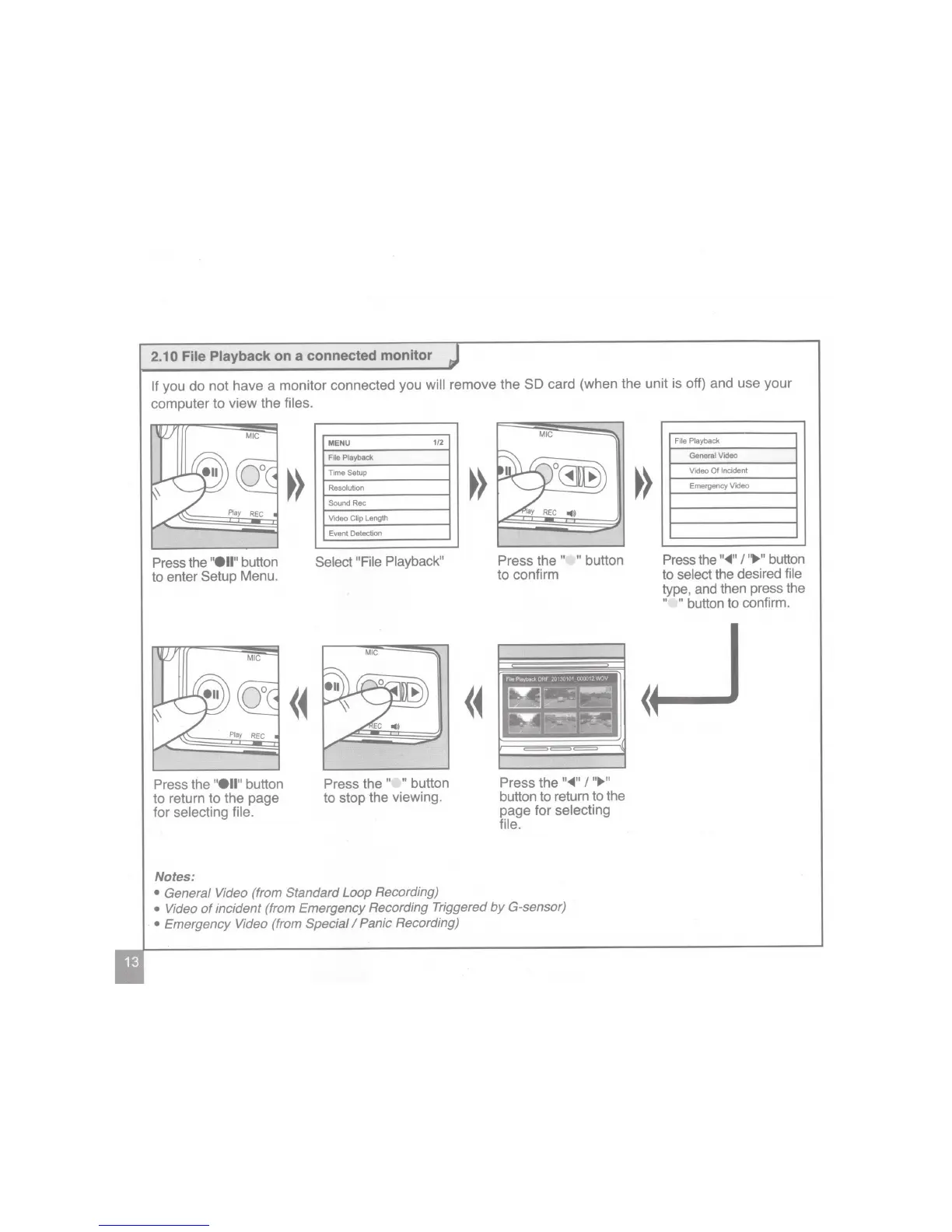
2.1
0 File Playback
on a connected monitor
If
you do
not
have a monitor connected you
will
remove the SO
card (when the unit is off) and use your
computer
to
view
the
files.
Press
the
"ell"
button
to enter Setup Menu.
Press
the
"ell"
button
to return to the page
for selecting file.
Notes:
MENU
1/2
File
Playback
Time Setup
Resolution
Sound Rec
Video
Clip
Length
Event Detection
Select "File Playback"
Press
the
" "
button
to stop the viewing.
General Video (from Standard Loop Recording)
MIG
Press
the
" "
button
to confirm
Press the
"~"
I
"~"
button to return to the
page for selecting
file.
Video
of
incident (from Emergency Recording Triggered
by
G-sensor)
·
Emergency Video (from Special
I
Panic Recording)
File Playback
General Video
Video
Of
Incident
Emergency Video
Press
the
"~"
I
"~"
button
to
select
the desired
file
type, and then press the
" "
button to confirm.

Related product manuals