Need help?
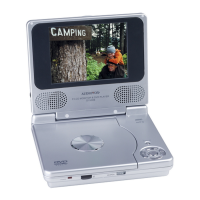
Do you have a question about the Audiovox PVS72901 and is the answer not in the manual?
Guidelines for optimal unit placement to ensure proper ventilation and avoid environmental damage.
Crucial safety measures for handling power cords, plugs, and general unit usage to prevent hazards.
Covers LCD screen, brightness, color, and screen mode adjustments for optimal viewing experience.
Details buttons for disc access, playback, pausing, stopping, skipping, and fast searching.
Describes buttons for power (standby/on), setup menu access, and special function keys like Audio, Subtitle, Menu.
Instructions on connecting the unit to a vehicle's power source using the provided adapter.
Guides on how to connect the DVD player to a television for viewing playback.
Provides instructions and cautions for connecting headphones for private listening.
Steps for powering on the DVD player and selecting the correct input/mode.
Detailed procedure for properly loading discs into the player for playback.
Basic steps to start and manage disc playback, including resuming stopped playback.
How to stop, resume, fast forward, reverse, and skip tracks during playback.
 General
| Brand | Audiovox |
|---|---|
| Model | PVS72901 |
| Category | DVD Player |
| Display Type | LCD |
| Battery Life | 2.5 hours |
| Aspect Ratio | 16:9 |
| Audio Output | Stereo |
| Weight | 2.2 lbs |
| Headphone Jack | Yes |
| Remote Control | Yes |
| Output Resolution | 480p |
| Resolution | 480 x 234 pixels |
| Supported Media | DVD, CD, MP3 |
| Power Supply | AC adapter |
| Screen Size | 7 inches |


 To Next Page