GB - 9
CONNECTIONS
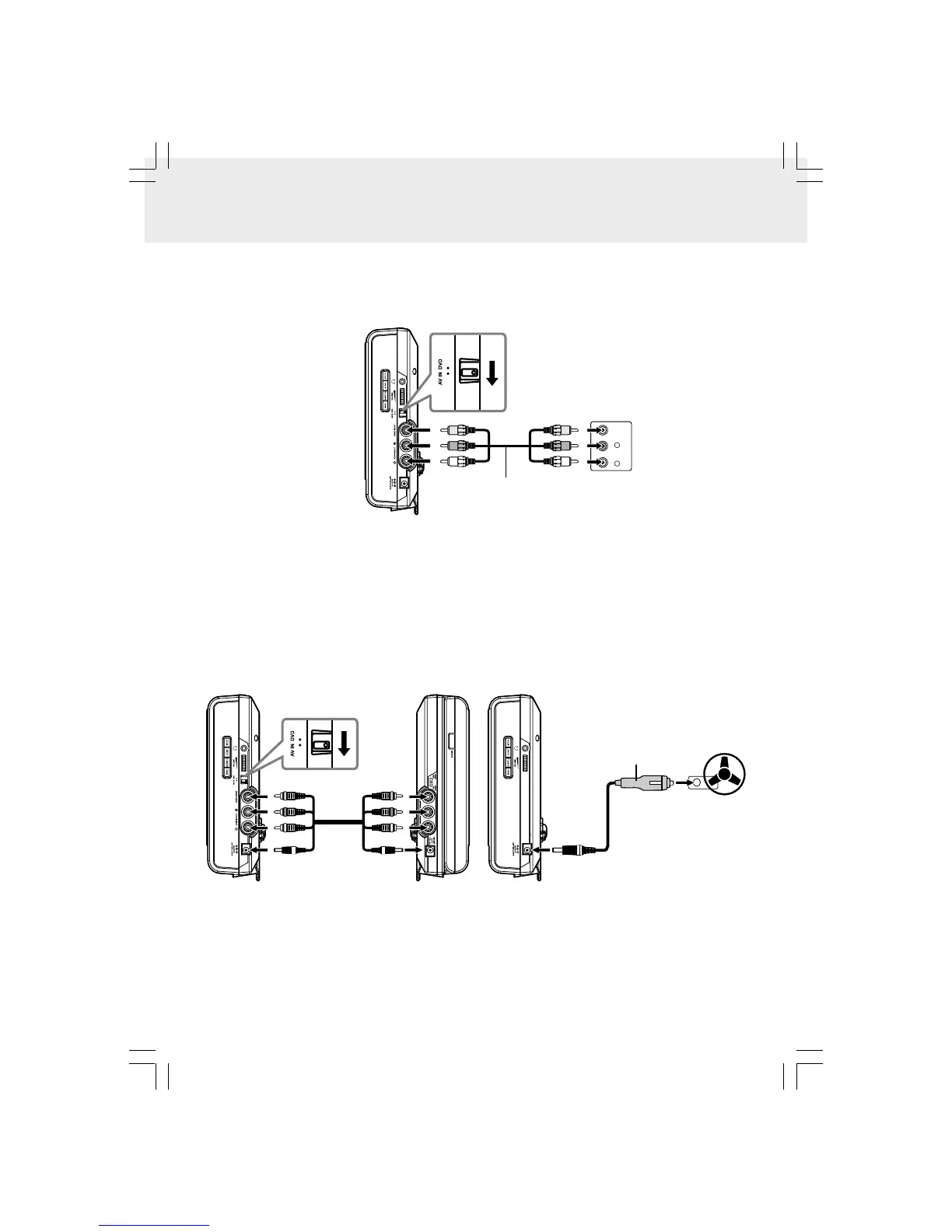
D. Watching the Same DVD on Both Units
You can watch the same DVD on both Units.
Watching video equipment
1. Turn on Unit A. Set the AV IN / DVD switch to AV IN.
2. Connect the other equipment to Unit A using a standard AV Cable.
3. Turn on the video equipment and follow the instructions provided with it to playback.
Notes:
• Make sure to use the correct Audio/Video cable. Connecting the plugs incorrectly may cause a weak signal.
• If you have a mono VCR, the volume level from the speakers will be low.
C. Connecting Game Systems/Video Equipment
You can connect game systems or other video equipment for playback through Unit A only. You cannot connect these
systems to Unit B.
VIDEO
OUT
L
R
AUDIO
OUT
GAME SYSTEMS/
VIDEO EQUIPMENT
White YellowRed
AUDIO/VIDEO CABLE
(not included)
RIGHT SIDE OF UNIT A
White YellowRed
To
AUDIO IN/OUT,VIDEO IN/OUT
& CAR PLUG -12V jacks
To the cigarette
lighter socket
CAR POWER ADAPTER
To CAR PLUG-12V jack
RIGHT SIDE OF UNIT B
LEFT SIDE OF UNIT B
DC-AV
CABLE
To
AUDIO OUT, VIDEO OUT
& DC OUT 9 -12V jacks
White YellowRed
White YellowRed
RIGHT SIDE OF UNIT A
Watching the same DVD on both Units
1. Turn on Unit A and B. Set the AV IN / DVD switch on Unit A to AV IN.
2. Connect Unit A and B using the included DC-AV Cable.
3. Play a DVD on Unit B; Unit A will play at the same time by AV IN.
Note:
• Make sure to use the correct Audio/Video cable. Connecting the plugs incorrectly may cause a weak signal.



 To Next Page