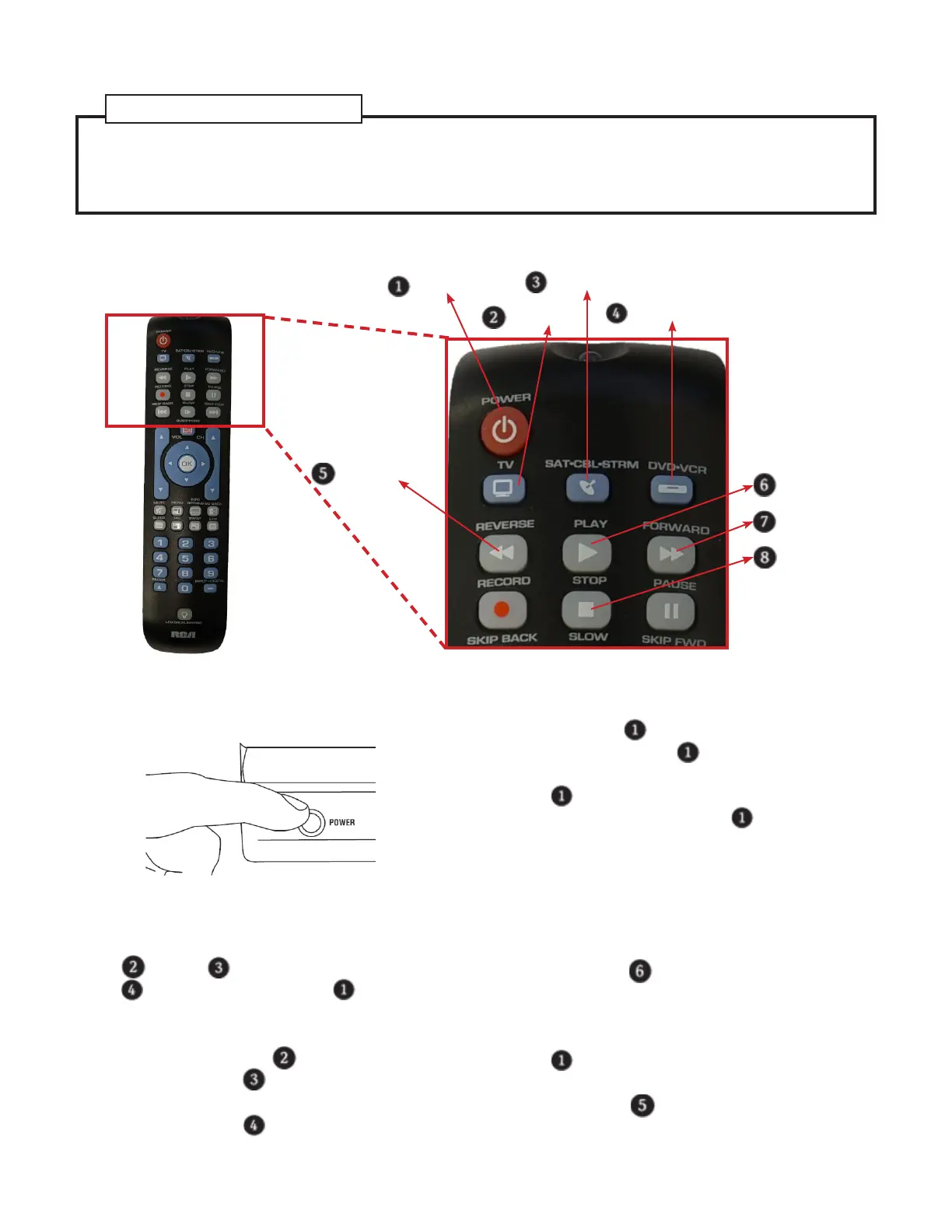
Auto Code Search
Power Key
TV Key
SAT•CBL•STRM Key
DVD•VCR Key
Reverse Key
Play Key
Forward Key
Stop Key
1. Turn on the device that you want to control by
manually pressing its power button.
2. Set up the remote for programming.
a. Press and hold one of the device keys (
TV Key
,
SAT•CBL•STRM Key
, or
DVD•VCR Key
) until the
Power Key
lights up.
Note: Each device key is associated with a
type of device—the
TV Key
is preset to
search for TVs,
SAT•CBL•STRM Key
for
satellite receivers, cable boxes or digital TV
converters and
DVD•VCR Key
for DVD
players.
b. While you’re holding down the device key,
use your other hand to press and hold the
remote’s
Power Key
at the same time.
The light on the
Power Key
will turn off.
c. Keep holding both keys until the
Power Key
lights up and stays on. Then
release both keys. The
Power Key
should
remain lit up from now until the end.
Note: Point the remote to the device you
want to control in the following steps.
3. Search for the correct code:
a. Press the
Play Key
and observe the de-
vice that you want to control.
b. Repeat step 3a. until your device turns
off at least once. Wait until the light on
Power Key
stops ashing.
c. Check if the device is on or off.
• Press the
Reverse Key
and wait 2 sec-
onds. Repeat this step until the device
changes state (i.e., change from off to on or
To program the remote automatically, the Auto Code search goes automatically through all the codes
for the device that you are trying to control. The following parts will be used.
Brand Code Search .........................................................................................................3
Direct Code Entry ............................................................................................................. 4
Manual Code Search ....................................................................................................... 5
References to Similar Task


 To Next Page
 Loading...