3. Press and hold the device key you want to pro-
gram (the POWER key illuminates).
While you’re holding down the device key, use
your other hand enter the rst ve-digit code for
your brand in the code list (the POWER key turns
off after the rst digit).
4. When you’ve nished entering the ve-digit
code, keep holding down the device key and look
at the POWER key.
Is the POWER key illuminated?
YES: You’re done! You’ve programmed this device
key.
NO, it blinked four times and turned off: You ahve
either entered a code number that is not in the
code lists or missed a step in the code entry pro-
cedure. Try step 3 again.
Manual Code Search
Auto Code Search ............................................................................................................2
Brand Code Code Entry ................................................................................................... 3
Direct Code Search..........................................................................................................4
References to Similar Task
The Manual Code Search lets you go one-by-one through all the codes for the device you’re trying to con-
trol. When you nd the one that operates your device, you can stop the search and store that code.
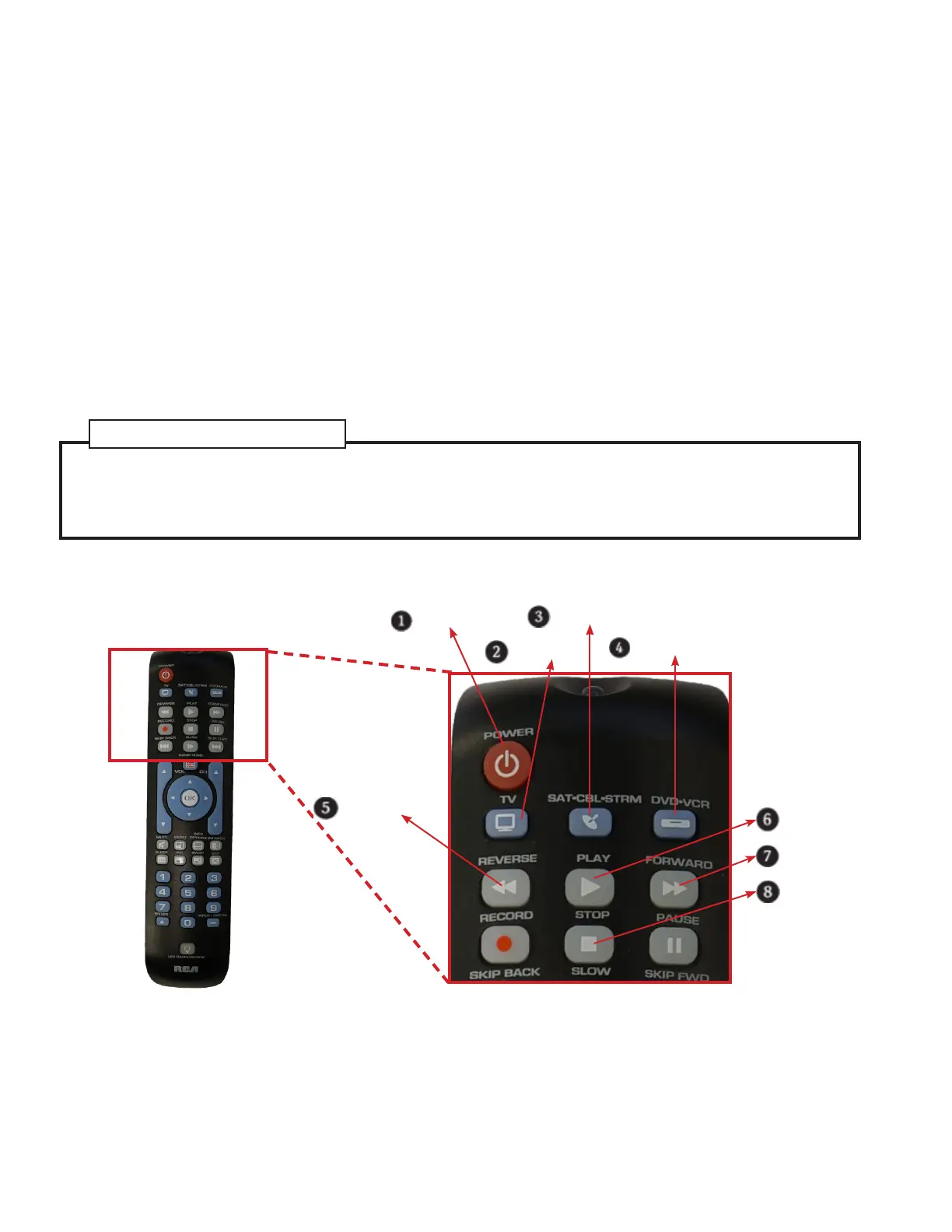
Power Key
TV Key
SAT•CBL•STRM Key
DVD•VCR Key
Reverse Key
Play Key
Forward Key
Stop Key
TIPS: The Manual Code Search method may take a long time because the remote searches through all of
the codes in
its memory one-by-one. If your brand is listed in the Brand Codes or the Code Lists, rst try the Brand Code
Search or the Direct Code Entry method.
Each device key is associated with a type of device—the TV is preset to search for TVs, SAT•CBL•DTC for
satellite receivers, cable boxes or digital TV converters, and DVD•VCR for DVD players. To program the
DVD•VCR key to control a PVR or VCR, see the Reassigning the DVD•VCR Key to Control a VCR section.
To exit without saving a new code at any point in the Manual Code Search, press the EXIT key.


 To Next Page
 Loading...