from on to off).
Note: If you accidentally press the
Reverse Key
after the device changes its
state, press the
Forward Key
. Wait 2 sec-
onds to see if your device changes state again.
4. Press the
Stop Key
to stop the process. The
light on the
Power Key
should turn off.
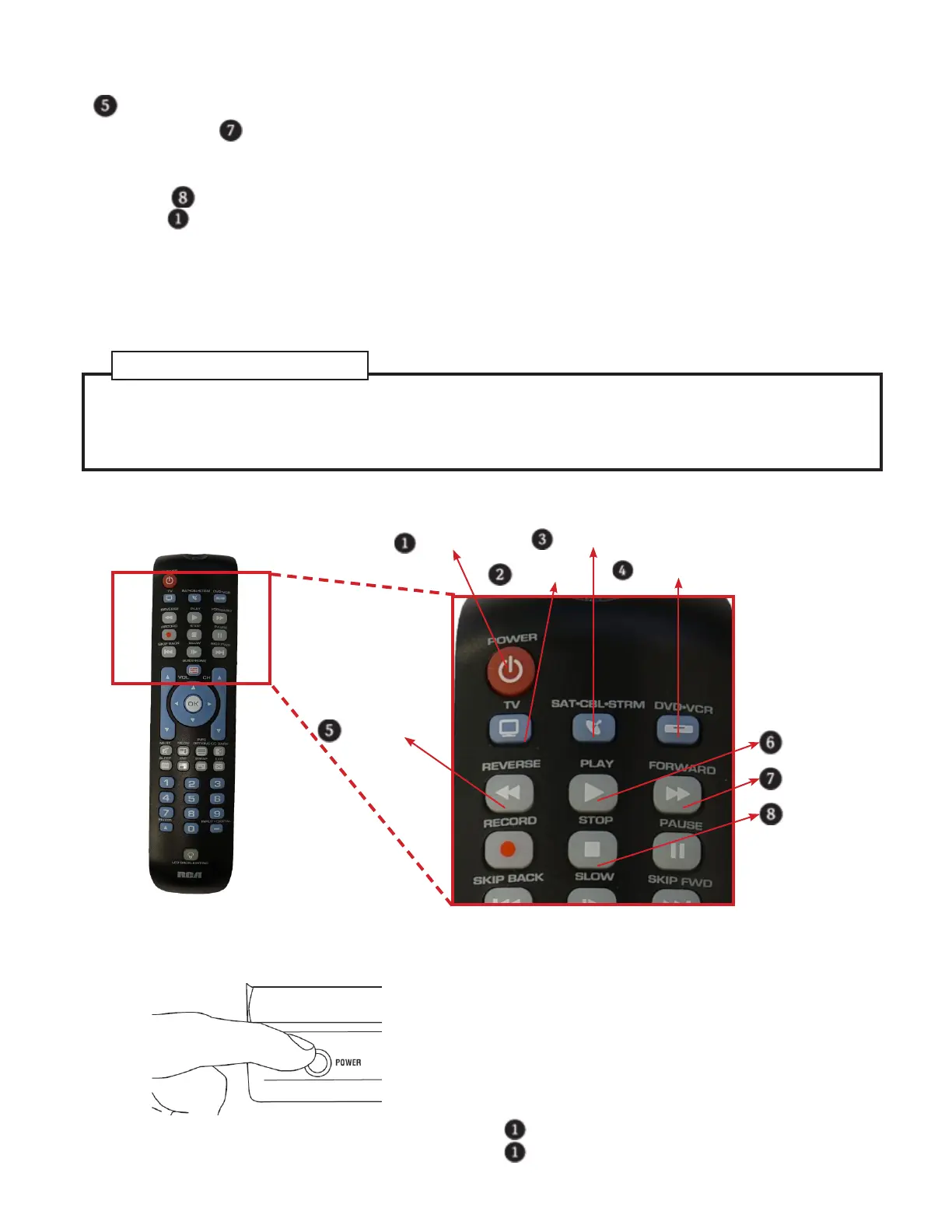
Brand Code Search
Power Key
TV Key
SAT•CBL•STRM Key
DVD•VCR Key
Reverse Key
Play Key
Forward Key
Stop Key
The Brand Code Search goes through only the codes for one of the select brands listed in the ac-
companying code list. If your brand of device is listed, this search can be very quick and easy.
Auto Code Search ............................................................................................................2
Direct Code Entry ............................................................................................................. 4
Manual Code Search ....................................................................................................... 5
References to Similar Task
1. Turn on the device you want to program by
manually pressing the power button.
2. Find your device’s brand in the Brand Code list
section of the accompanying code list. Circle the
number for your brand and keep the list handy.
3. Press and hold the device key you want to pro-
gram. The POWER key illuminates.
4. While you’re holding down the device key, use
your other hand to press and hold the remote’s
Power Key
at the same time. The light on the
Power Key
will turn off.


 To Next Page