5. Wait until POWER key comes on and stys on.
Then release both keys.
6. Look at the numbers you circled for your de-
vice’s brand code number. Press those numbers
on the remote keypad.
Note: For single-digit brand codes, press the 0 key
rst (for example, 0-5 for 5).
7. Point the remote directly at the front panel of
the device you want to control. Press POWER on
the remote and wait 2 seconds. The remote is
testing a single code for your device’s brand.
Did your device turn off?
Yes: Press the STOP key to store the code. You’re
done! You’ve programmed this device key.
No: Press POWER again. The remote tests the
next code for your brand.
Keep pressing POWER every 2 seconds until your
device turns off.
Direct Code Search
The Direct Code Search lets you enter a code from the accompanying code list for your brand of
device. It’s not as easy as the other methods, but it’s potentially the fastest method.
Auto Code Search ............................................................................................................2
Brand Code Code Entry ................................................................................................... 3
Manual Code Search ....................................................................................................... 5
References to Similar Task
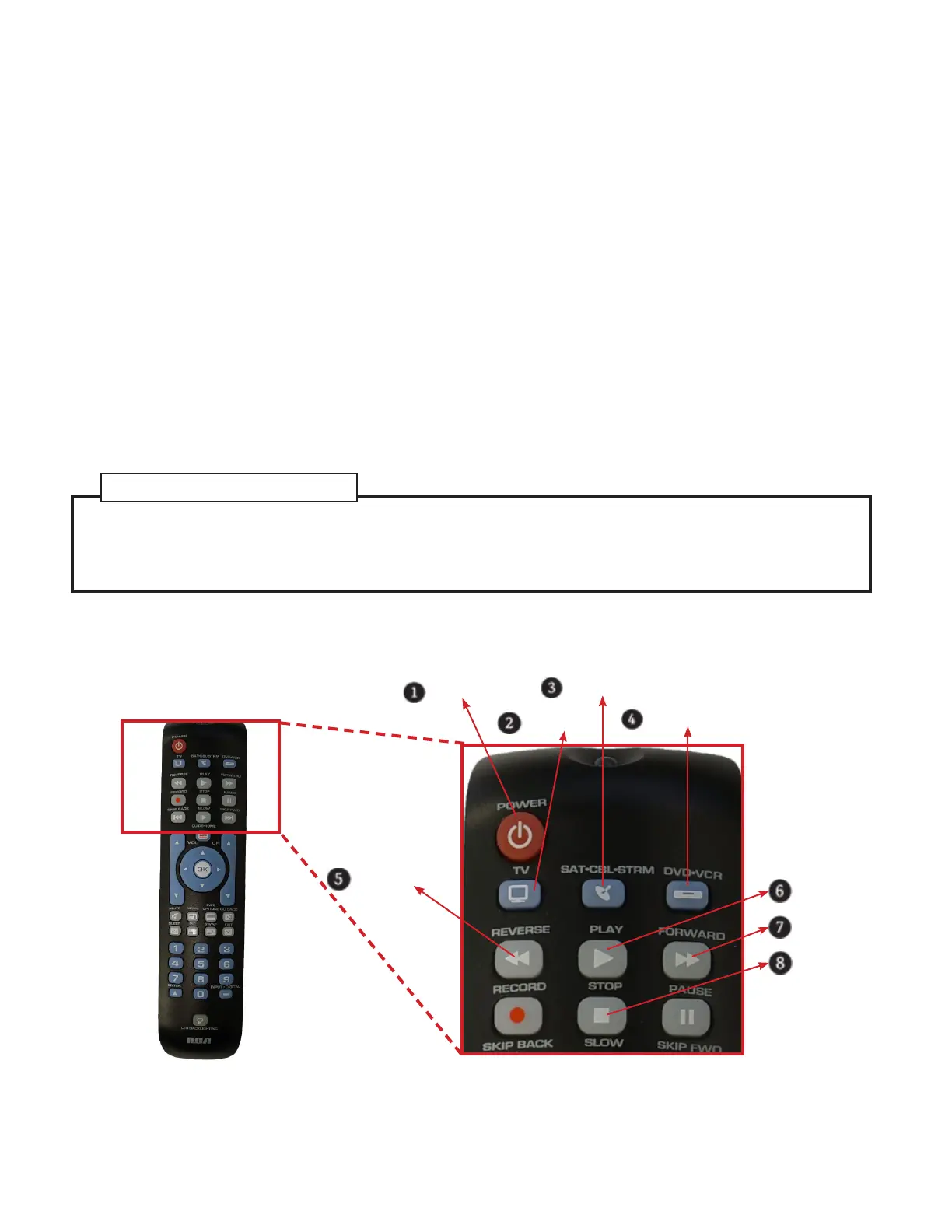
Power Key
TV Key
SAT•CBL•STRM Key
DVD•VCR Key
Reverse Key
Play Key
Forward Key
Stop Key
1. Manually turn on the device you want to con-
trol.
2. Find the Code List that came with the remote.
Locate the section for the type of device you’re
trying to program, and nd your brand in that
section. Circle the codes for your brand and keep
them handy.


 To Next Page