Audio Style Modeling
KETRON • AUDYA 13
Here how to control the Style Modeling from the Style Compiler program:
Create your on style from scratch:
By “Utility&Setting” select the ”Create empty structure” feature. Type firstly your style name and than 1.
create a master folder where to save it.
Press ”Compile Midi files” and select a Midi file (e.g.: MyNewStyle.mid).2.
Press ”Audya Style Modify”and load the Pattern just compiled.3.
Jump on step #5.4.
Create a new style (or edit) starting from an existing style:
Create a folder having the same name of the style and copy the Pattern into the folder.1.
Press Audya Style Modify and load this Pattern.2.
Jump on step #53.
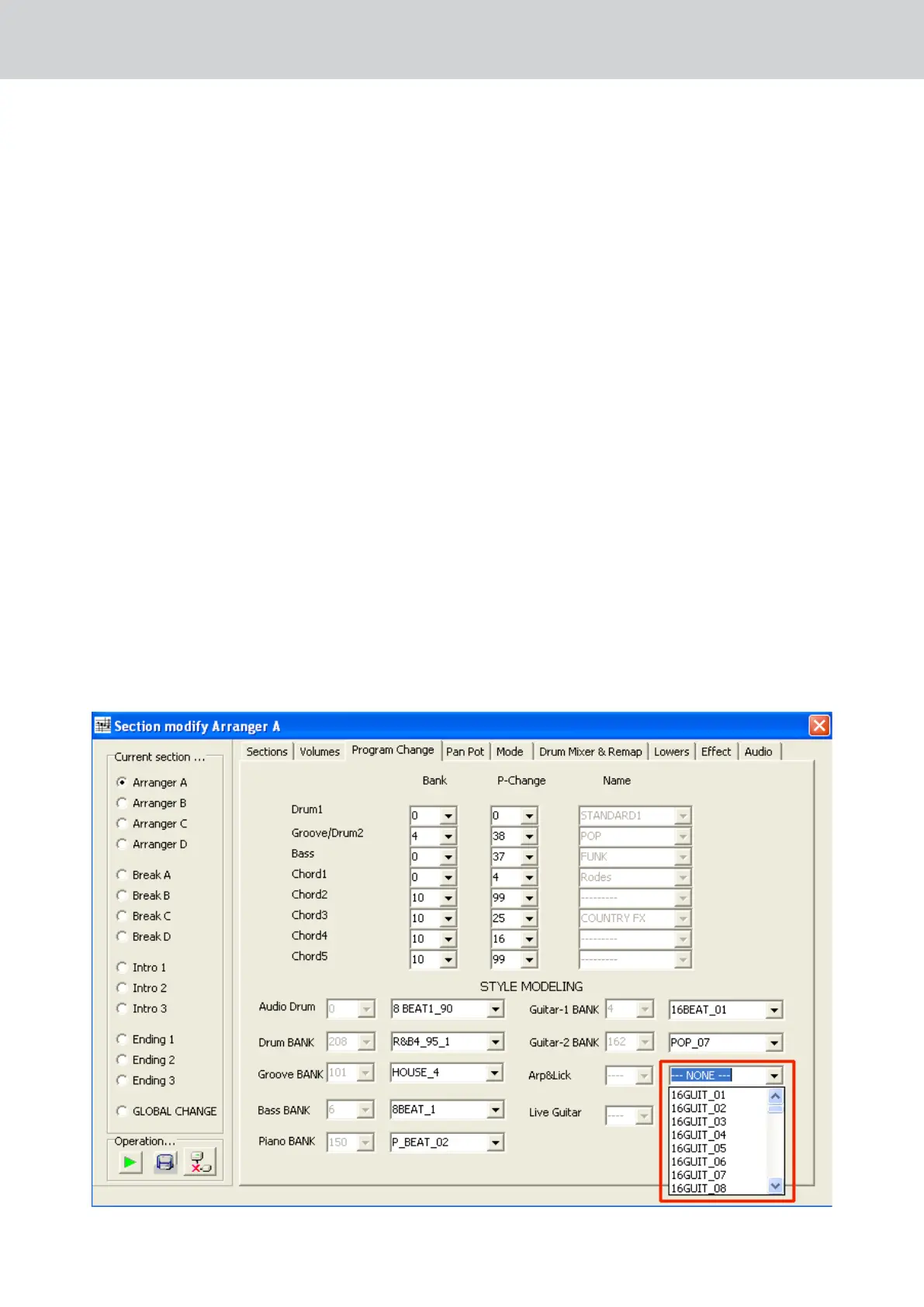
on Program Change menu you can select several Grooves and templates from the huge Bank Library and 5
you can assign it to each style part.
Style Bank Channel Chord name
Audio Drum Audio Output Drum 1
Drum Bank 10 Drum 1
Groove Bank 11 Groove
Bass Bank 5 Bass
Piano Bank 6 Chord 1
Guitar 1 Bank 7 Chord 2
Guitar 2 Bank 8 Chord 3
Arp&Lick 11 Chord 4
Live Guitar 12 Chord 5


 To Next Page
 Loading...