English
8. Troubleshooting
•
your computer.
Update the driver of the Bluetooth module on
Problem
Won't turn on.
Can’t find the
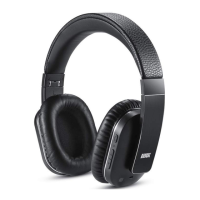
EP750
Can’t install the
driver for EP750
on a computer.
Solution
•Please charge the EP750
•
within 10 meters from the device.
Confirm the EP750 is in pairing status and
The sound quality
is intermittent in
Bluetooth mode.
•Disable the Wi-Fi on your source device.
No sound.
•Check the volume on both the source device and
the EP750
English
-9--8-
7. Specification
6. Charging
Connect the EP750 to a powered USB port using the provided
USB charging cable. While charging, the status LED will light
red. It will turn blue once the battery is fully charged.
A full charge takes approximatively 3 hours depending on
power input.
No sound on the
second device.
•Ensure the audio socket used on the second
device is audio – in. Ensure the second device
is on if required.
Use a standard 3.5mm double Jack audio
cable. Using a microphone enabled audio
cable may cause problems.
•
Noise cancelling
not working
•Please switch the ANC on.
Please charge the internal battery of the
headphones
•
Bluetooth Version V4.1 with aptX
Bluetooth Distance 10m
Transmission Frequency 2.40GHz-2.48GHz
Support Profile HSP/HFP/A2DP/AVRCP
Speaker Diameter Ø40mm
Impedance 32Ω
Speaker Output 20mW x 2
Frequency Response 20Hz-20kHz
Signal and Noise Ratio(SNR) ≥85dB
Distortion ≤1%
Noise Reduction Level Up to 20dB (at 100–200Hz)
Battery Type 3.7V/ 270mAh Li-polymer Battery
Bluetooth Working Time About 15 Hours
Bluetooth ANC Working Time 14 Hours
Charging Time About 3 Hours
Standby Time 540 Hours
Charging Port Micro USB
Dimensions 200 × 180 × 65mm
Net Weight 255g


 To Next Page