5.Operation
5.1 First Use
Take out both earphones then re-insert them back into the case to activate the earphones.
If headphones fail to be charged, please charge the charging case (for details, please refer 5.2).
Take out both earphones then re-insert them back into the case to activate the earphones, The EP800
will enter connection mode and the left status LED will flashes white and red.
5.2 Power
Please fully charge the EP800 before first use or if left unused for a long period of time.
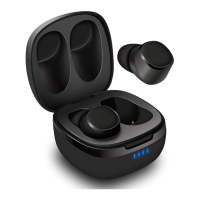
To charge earphones, put earphones into the charging case. While charging, two status LED lights red
and turns off once fully charged. To charge the charging case, use the power cable to connect the
charging case to a powered USB port.
The battery indicator flash one bar and turn to four bars once fully charged. While charging, the
battery indicator flash one bar and turn to four bars once fully charged.
5.3 Switch On / Of
5.3.1 Switch On / Off by charging case
To switch on the EP800, take out both 2 earphones from the charging case. The EP800 will enter
reconnection mode and the left status LED will flash white.
To switch off the EP800, insert both 2 earphones back into the charging case.
5.3.2 Switch On / Off by earphones (when earphones not in the charging case)
To switch on the EP800, press and hold Power Button for 1 second. The EP800 will enter reconnection
mode and the left status LED will flash white.
To switch off the EP800, press and hold Power Button for 5 second.
5.4 Bluetooth Connections
The EP800 will enter reconnection mode after switching on and will connect to any previous known
device automatically. For first connection, please refer 5.1 First use. To pair to a new device, insert
earphones back into the charging case, then disconnect the EP800 from your old device. Take
earphones from the charging case again. The left status LED will flash white for around 30 seconds at
first, and the left status LED will flash white and red alternately which indicate EP800 enter pairing
mode.
– For mobile phones and tablets


 To Next Page