1. Scan for available Bluetooth device on your mobile phone or tablets. (Please consult your device’s
user manual if necessary)
2. Select ‘EP800.L’ from the available devices and confirm the connection.
3. Once successfully connected, the status LED will turn off.
– For computers
1. Enable the Bluetooth function on your computer.
2. Select ‘Device and Printers’ from the Control Panel and click ‘Add a Device’.
3. Select ‘EP800.L’ from the available devices, the system will automatically install the driver
automatically. If a pin code is requested, please enter the code ‘0000’.
4. Once successfully paired and connected, the status LED will turn off.
5.5 Resetting
Please try the following steps if fail to connect with the mobile device
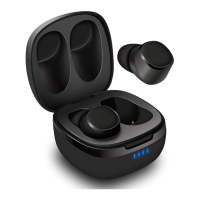
Take out two earphones, press and hold the power button for 5 seconds to turn off the earphones. Two
LED turn off. Press two power buttons for 10 seconds, two LED will flash white and red, then both turn
off. Put two earphones back to the charging case. And then take them out from the charging case
again, The EP800 will enter connection mode. Connect your device with EP800.
5.6 Remote Control
Press the button to answer the phone call.
Press the button again to hang up the phone call.
Press and hold the button for 1 second to decline the phone call.
Under the calling status, press and hold the button for 1 second to switch audio output between device
and earphones.
Under the calling status, press the button twice to turn on or off the Mute function.
Press the button to play or pause the music.
Press the button twice to play the next song.
Press the button for 3 times to play the previous song.
Underthe standby status, pressthe button for 3 timesto active the voice assistant.
Under the standby status, press the button for 4 times to dial the last calling number.
6. Charging
To charge earphones, put earphones into the charging case. While charging, two status LED lights red
and turns off once fully charged. To charge the charging case, use the power cable to connect the
charging case to a powered USB port.
While charging, the battery indicator flash one bar and turn to four bars once fully charged. A full
charge takes approximatively 1.5 hours depending on power input.
Note:
1. When charging the EP800, ensure that the output voltage from the USB port or charger is 5V.
Using a voltage greater than 5V may damage the earphones.
2. Please fully charge the EP800 before first use or if left unused for a long period of time.
3. If you are using a smart USB charger, use the common USB port, ensuring that the output voltage
is 5V.
7. Specification


 To Next Page