-2-
-3-
English
AUX IN
OPTICAL
DC 5V
Ⅰ Ⅱ
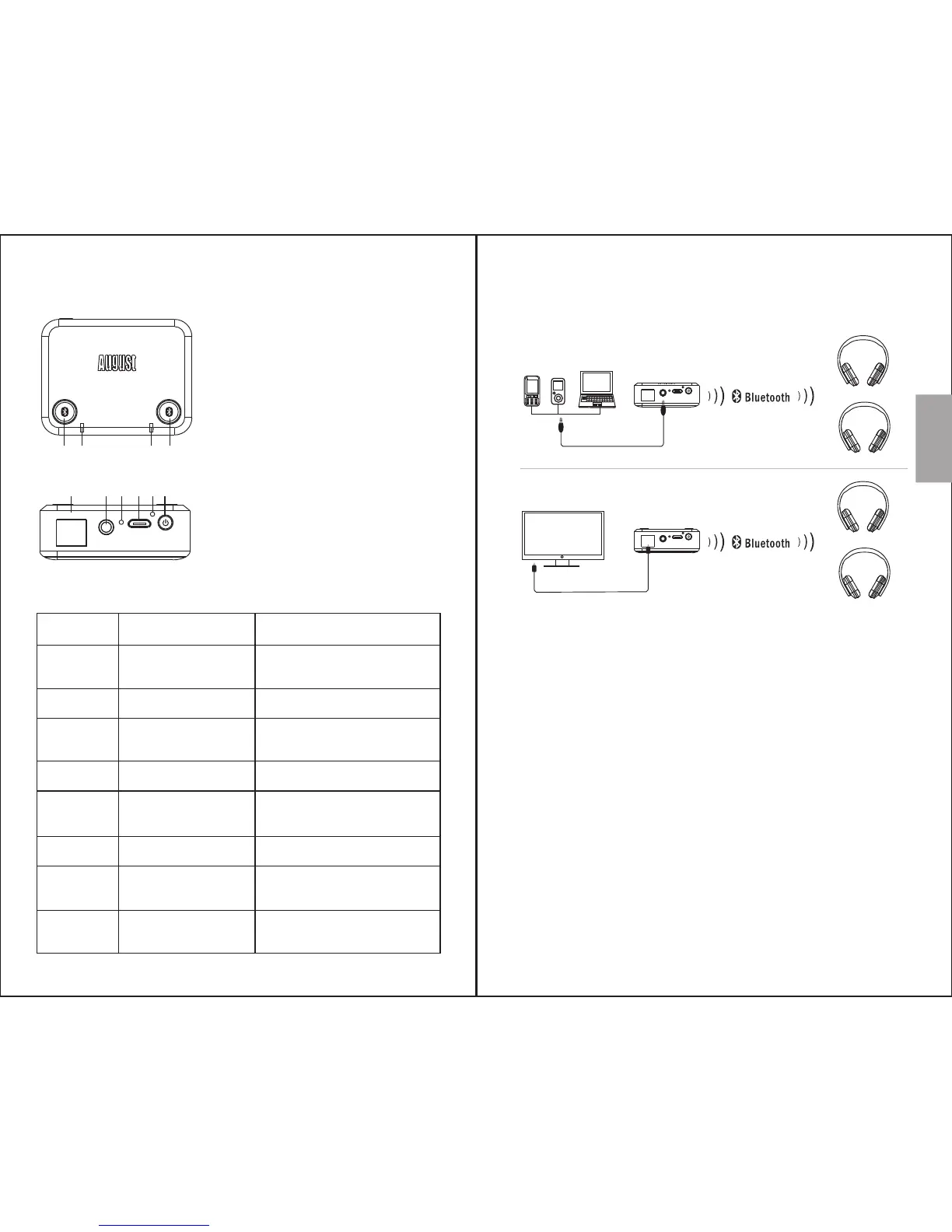
4. Part Names and Functions
1 342
5 6 7 8 9 10
1. Button I
2. Status LED I
3. Button II
4. Status LED II
5. Optical Audio In
6. Aux In
7. Charging LED
8. Charging Port
9. Reset Button
10.Power Button
Status LED
I & II
I & II
I
I
II
II
Constant White
Flashing White
Flashing White
and Blue
Constantly Blue
Flashing White
and Blue
Constantly Blue
Charging
LED
Charging
LED
Red
Green
4.1 Status LED Meaning
Indication
Searching for Paired
Devices to Connect to
Low Battery
Paring Mode for
Device 1
Connected to Device 1
Paring Mode for
Device 2
Connected to Device 2
Charging
Fully Charged
5. Operations
5.1 Setup
Note: When both optical and aux audio input are
connected, the MR270 will use the aux audio
input.
5.2 Bluetooth Connection
Press and hold the power button to switch the
MR270 on.
Both status LEDs will light white and the MR270
will search for paired devices to connect to.
AUX IN
OPTICAL
DC 5V
Optical Audio Cable
Optical connection
AUX IN
OPTICAL
DC 5V
3.5mm Audio Cable
Aux connection


 To Next Page