Need help?
Do you have a question about the auna multimedia Georgia 10026949 and is the answer not in the manual?
Specifications including power supply, DAB/FM frequencies, dimensions, weight, and scope of delivery.
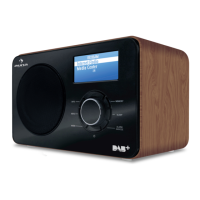
Diagram illustrating the main components and controls of the radio device.
Instructions for turning the radio device on and off using the Standby button.
Procedure for scanning and storing available radio stations upon first use.
Guidance on automatic clock setting via DAB and manual time/date adjustment.
How to navigate DAB stations and adjust volume.
Steps for scanning and tuning FM radio stations.
Instructions for storing and accessing favorite radio stations.
Details on information displayed for DAB broadcasts like DLS, signal strength, and multiplex names.
Details on information displayed for FM broadcasts like RDS text and audio mode.
Procedure for configuring alarm functions, including setting time and volume.
How to use the snooze feature to temporarily silence an alarm.
Accessing settings such as system version and factory reset.
Option to adjust FM scan sensitivity to stop on all or strong stations.
Information on proper disposal of the product and packaging according to regulations.
 General
| Tuner Type | Digital |
|---|---|
| Wi-Fi | Yes |
| Ethernet LAN | No |
| USB port | Yes |
| Headphone outputs | 1 |
| AUX in | Yes |
| Colour | Black |
| Type | Internet |
| Connectivity | Wi-Fi |

 To Next Page