11
Functions
General functions
• Press POWER/INPUT to switch the device on. Hold for standby.
• Press INPUT repeatedly to select the desired input (USB / SD / LINE IN / BT)
• Press FUNCTION+/- to change the illumination and adjust the MIC and guitar volume levels.
• Press MENU repeatedly for accessing the options BR (brightness), BA (bass), TB (treble), 1u (Mic Vol),
2U (Guitar Vol), BO (light model), DL (delay) und EC (echo).
Adjust each value with FUNCTION +/-
BT - Playback
• Press INPUT to select BT mode.
• Acitvate BT on your smartphone/tablet and pair with THUNDERSTORM.
• Use your BT device to navigate through your media library.
Speaker Pro App
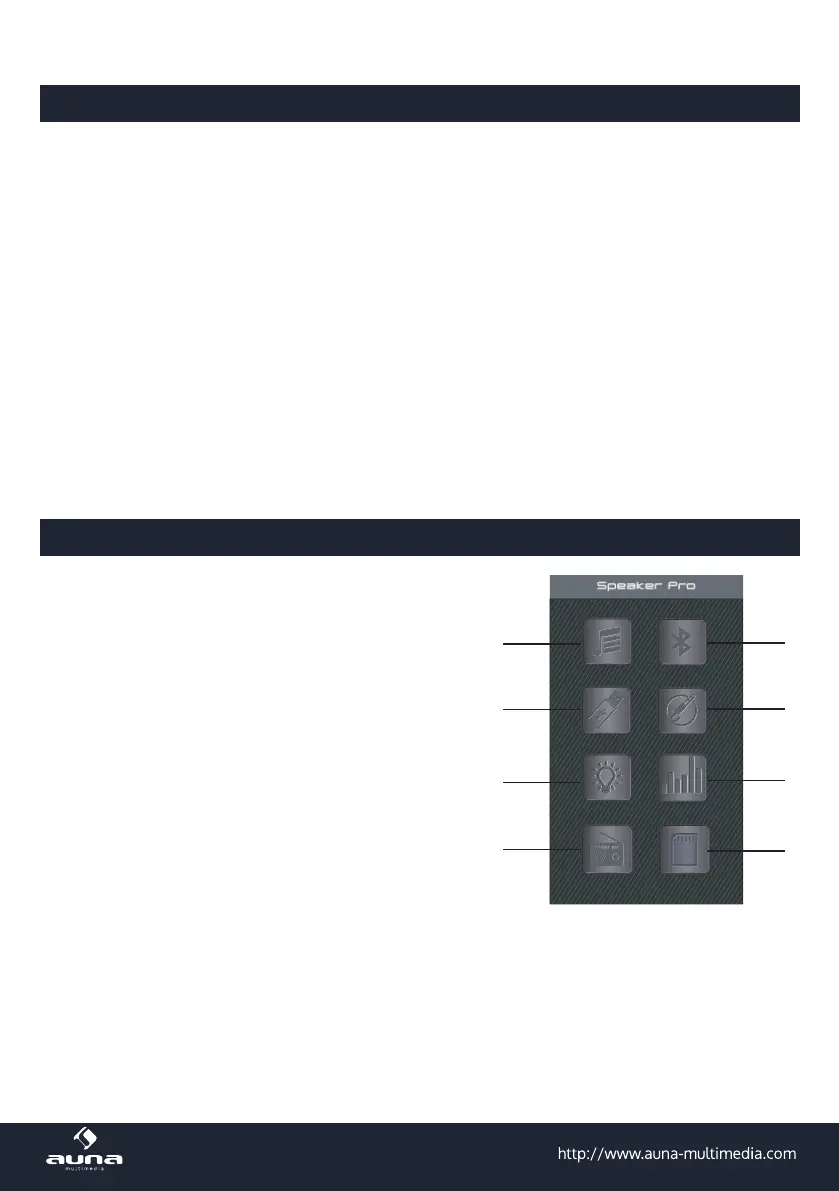
Download the Speaker Pro App app from the App Store or from
Google Play and install it on your smartphone or tablet.
Launch the app. The main screen will appear:
Tap on the BT icon rst to connect the app with the device.
1 BT music play
2 USB card play
3 Light control colour,
brightness and light
ash mode
4 FM radio
5 Control BT connect
6 Line In input - mute
7 Equalizer,volume
adjustment for music,
Microphone input.
8 SD card(The instruction
for SD card play is as
same as USB card play)



 To Next Page