55
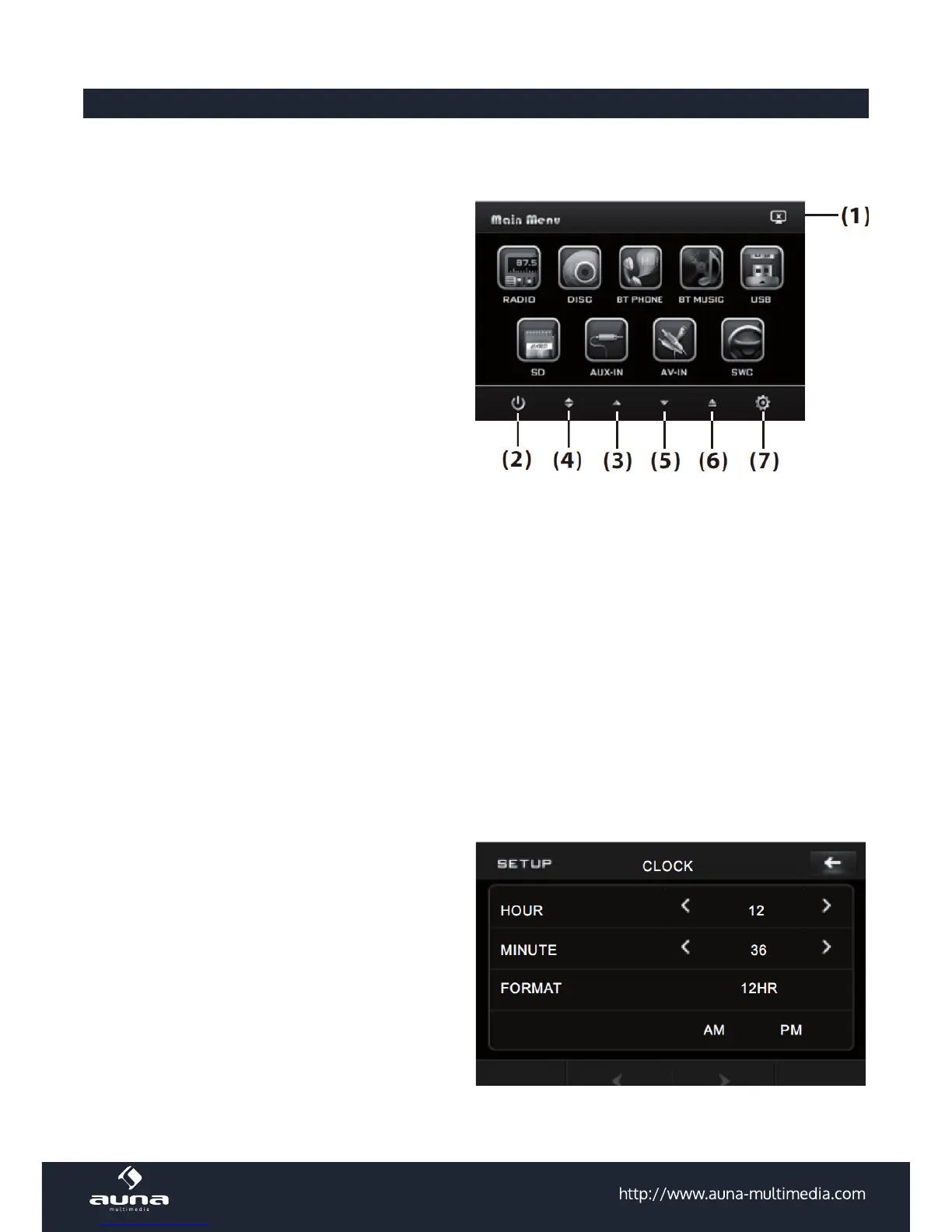
Main Menu / Setup Menu
TFT Monitor Adjustment:
Touch the screen to enter the home menu, the
message like following as:
The touch buttons on the base of the touch
monitor:
1. Switch o
2. SETUP: enter the settings menu.
3. Adjust the monitor angle
4. Open/close the monitor
5. Adjust the monitor angle
6. Eject Button: eject any inserted discs.
7. Setup/Preferences
Touch “SYSTEM” on the setting menu, touch the (up/down) ICONS to select the adjustment item, touch the
arrows left/right to adjust the selected item.
Adjustable parameters: Brightness, Contrast, Color, Tint;
ANIMATION
In RADIO mode, you can change the playing time of animation (OFF, 10S, 30S, 1M,90S, 2M, 3M, 4M).
The default animation time is set to 10sec.
SETTING WALLPAPER
Change the background color (AUTO, GREEN, YELLOW, RED, LIGHT BLUE, BLUE, PINK). Set “AUTO” for
automatical change.
SET TIME
Touch “TIME“ on the setting menu, touch the arrow
ICONS (up/down) to select the adjustment item,
touch the arrow ICONS (left/right) to adjust the se-
lectment item.
Adjustable items:
Hour, Minutes, Time format (24H/12H)



 To Next Page