24
EN
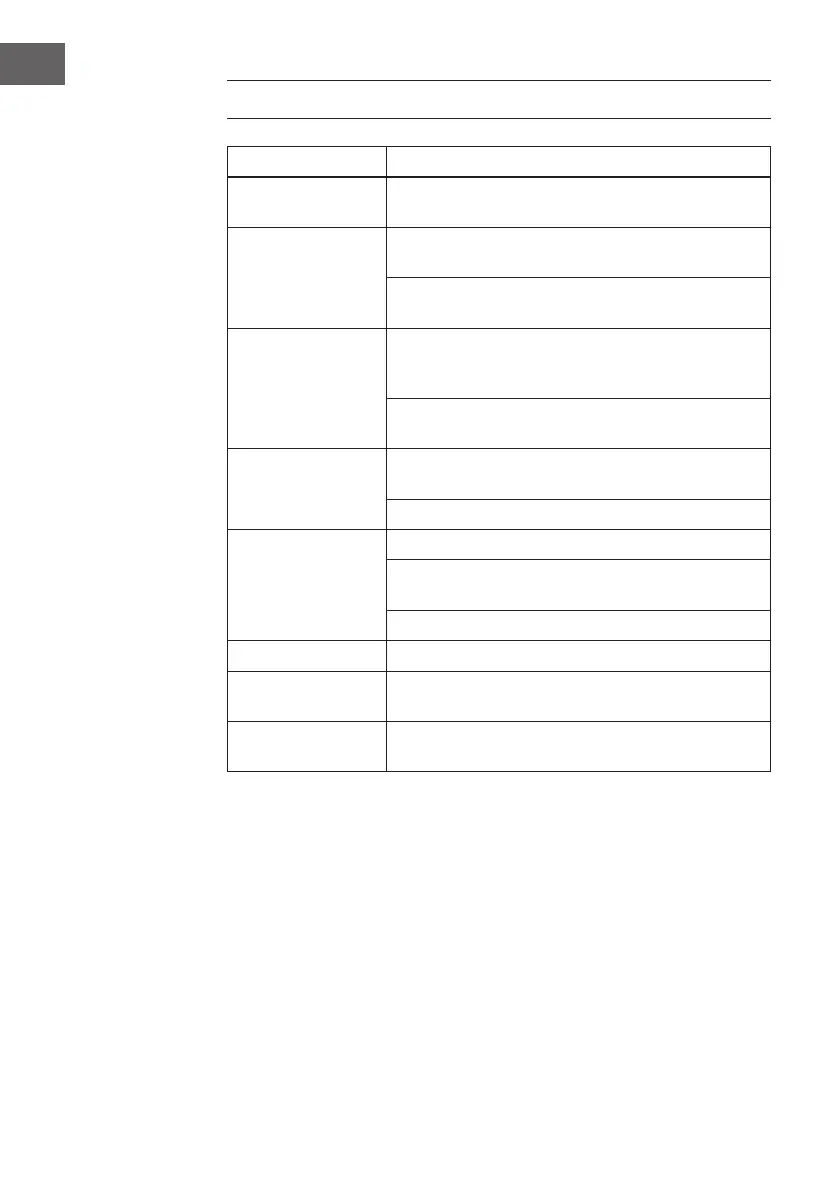
TROUBLESHOOTING
Problem Corrections
No Power
Check & make sure the power connection is securely
mounted.
No Picture
Ensure that the HDMI video cable is connected to the
output of your TV.
Press Video Mode button on your remote until it appears
normal picture.
No Sound
Change the System Audio Setup for STEREO Setting:
To be used when 2 speakers' outlets exist or when plug
directly into your TV unit.
Ensure that the "MUTE" button is not set to "ON" for DVD
player or TV unit. Ensure that the Audio cable is not faulty.
Failed to play.
Check that the disc is properly inserted or you may have to
clean the disc. Ensure that the disc has NO scratches.
Check the disc if it has the correct format.
Fail to respond
to remote control.
Remove obstacles between remote control a n d unit
Aim remote control at the sensor on the front panel of the
player
Check batteries & replace them if necessary
Picture blurred. Check the disc for dirt & scratches - clean or replace disc.
Disturbance
Shut down the unit, wait ten seconds and restart the unit
again.
Failed to work
with keys
Power surges or brown outs or other electrical phenomena
- shut down the unit, wait ten seconds and restart it again.



 To Next Page