EasyManua.ls Logo

auna Roadie Sing - User Manual

auna Roadie Sing
84 pages
Go to English
Print Icon
To Next Page IconTo Next Page
Loading...
www.auna-multimedia.com
Roadie Sing
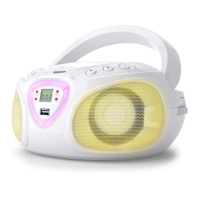
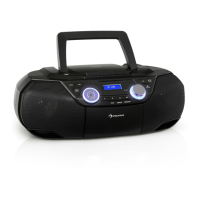
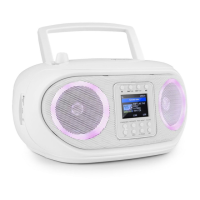
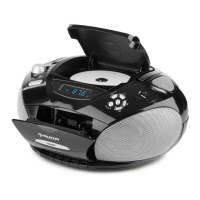
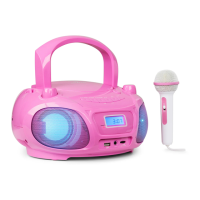
CD Boombox mit UKW-Radio und Lichtshow
CD Boombox with FM Radio und Lightshow
Boombox CD avec Radio FM et eet lumineux
Roadie Sing CD Boombox con radio OUC e show luminoso
CD Boombox con radio FM y espectáculo de luces
10032056 10032057 10032058

Questions and Answers

  • C
    carrollgeorgeJul 27, 2025
    What to do if there is no sound via Bluetooth on my auna Roadie Sing Portable Stereo System?
    • M
      Michael MartinJul 28, 2025
      If there is no sound from your auna Portable Stereo System via Bluetooth, ensure that the Bluetooth speaker is properly linked with your cell phone by going through the “BT Operations” process. Also, make sure the speaker is within the Bluetooth operating range. Finally, check that there are no cables plugged into the AUX IN jack, as this can prevent sound in BT function mode.
  • T
    Thomas JohnsonAug 1, 2025
    Why won't the CD player play on my auna Portable Stereo System?
    • H
      Heather HarmonAug 1, 2025
      If the CD player on your auna Portable Stereo System isn't playing, first, ensure that the unit is in CD function mode. If you're using a self-compiled CD, the media might not be compatible, so try using a better quality blank media and retest. Lastly, check if the batteries are exhausted and replace them if needed.
  • P
    Patrick FranklinAug 7, 2025
    How to stop CD skipping on auna Roadie Sing Portable Stereo System?
    • M
      Martin KellyAug 7, 2025
      If the CD skips while playing on your auna Portable Stereo System, the disc may be dirty or scratched. Try wiping the CD with a clean cloth or using another disc.
  • B
    Brandon MichaelAug 11, 2025
    Why does the auna Roadie Sing sound distorted at high volume?
    • T
      Thomas DoughertyAug 12, 2025
      If the sound from your auna Portable Stereo System distorts at high volume, it might be because the volume is set too high. Try lowering the volume to a more comfortable level. Alternatively, the batteries might be low; in this case, replace them with new ones.
  • M
    Monica MartinezAug 16, 2025
    How to fix noise or distorted sound on FM broadcast on auna Roadie Sing Portable Stereo System?
    • D
      Darrell SandovalAug 17, 2025
      If you experience noise or distorted sound on FM broadcast with your auna Portable Stereo System, first, retune the FM broadcast station to ensure it's properly tuned. Second, make sure the FM telescopic antenna is fully extended to improve reception.
  • K
    Kelly WyattAug 22, 2025
    What to do if the auna Roadie Sing CD player has intermittent sound?
    • B
      Brent HowardAug 22, 2025
      If you're experiencing intermittent sound from the CD player on your auna Portable Stereo System, it could be due to a dirty or defective disc; try cleaning the disc or replacing it. Another possibility is a dirty pick-up lens, which can be cleaned using a CD lens cleaning disc. Lastly, ensure the player is not subject to excessive shock or vibration; relocate it if necessary.

Summary

Safety Instructions

On Protection Against Laser Energy Exposure

Precautions regarding safe use of the laser beam in the CD player to prevent eye injury.

On Placement

Guidelines for properly positioning the unit to ensure optimal performance and safety.

On Condensation

Instructions on handling condensation formation inside the unit to prevent operational issues.

Product Overview

Power Sources

A. Battery Operation

Details on how to install and care for batteries in the unit for power supply.

B. AC Operation

Instructions for connecting and operating the unit using the AC power adapter.

Radio Operation

Tips for Best Reception

Advice on optimizing FM radio reception for clear audio playback.

CD Operation

Play Mode

How to start, pause, and stop CD playback, including basic controls.

Folder Mode (CD;MP3;USB)

Navigating music files by folder when using CD, MP3, or USB media.

Repeat Mode (Repeat;Repeat All;Repeat Off)

Options for repeating single tracks, entire folders, or turning off repeat function.

Program Mode (CD;MP3;USB)

How to program a custom playback sequence for tracks on CD, MP3, or USB.

USB Slot Operation

Aux In Operation

BT Operation

Pairing (Linking) a BT Enabled Cell Phone or Other BT Enabled Device to the Roadie

Step-by-step guide to connect Bluetooth devices like phones or tablets for audio streaming.

LED Light Shows

MIC IN (Karaoke)

Care and Maintenance

Troubleshooting

Disposal Considerations

auna Roadie Sing Specifications

General IconGeneral
Supported disc typesCD, CD-R, CD-RW
Supported audio formatsMP3
Tuner bandsFM
ConnectivityBluetooth, USB, AUX
Microphone inputYes
Karaoke functionYes
USB PortYes
AUX InputYes
MicrophoneIncluded
Power sourceAC 220-240V, 50/60Hz

Related product manuals