11
10
Press button to choose "Shut Down". Press again to choose "System
Standby". After the screen of digital player goes out,turn off the power
switch. button can also shut down the player.
SHUT DOWN
System Standby:
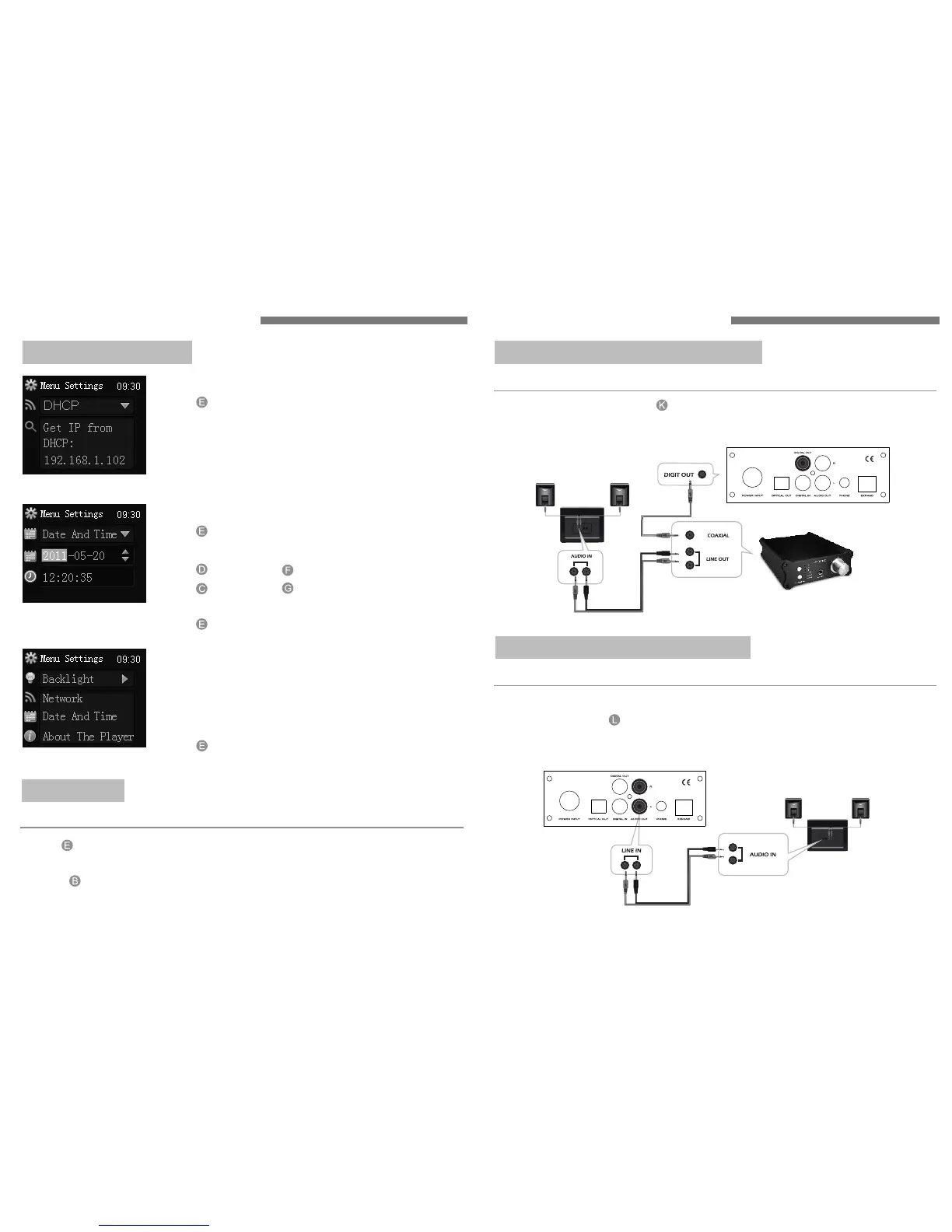
Press button to choose "Advanced Settings".
Press again to choose "Network Settings".
Press the same button to adjust the network
parameter of digital player.
Press again to confirm your adjustment.
Network Settings:
Enter the option of About The Player under
"Advanced Settings",you will see an option of
"Update System".
Select the option and you will see version information.
Press button to confirm update.
" "
Press button to choose "Advanced Settings".
Press again to choose "Date And Time Settings".
Press button and button to switch .
Press button and button to adjust the date
and time.
Press button to confirm your adjustment.
Date And Time Settings:
About The Player:
ADVANCED SETTINGS
The internal DAC decorder can change back to the high-fidelity audio signals.
The "AUDIO OUT" at the back is audio signal output port,which can be
directly connected to multimedia speakers or amplifiers.
DIGITAL CD PLAYER CONNECTION
Connect the player to amplifier with audio cable:
You can use the player to connect to
your DAC decoder.
"DIGIT OUT" output interface of
DIGITAL TRANSPORT CONNECTION
Connect the player to DAC with coaxial cable:
OPERATING INSTRUCTION OPERATING INSTRUCTION



 To Next Page