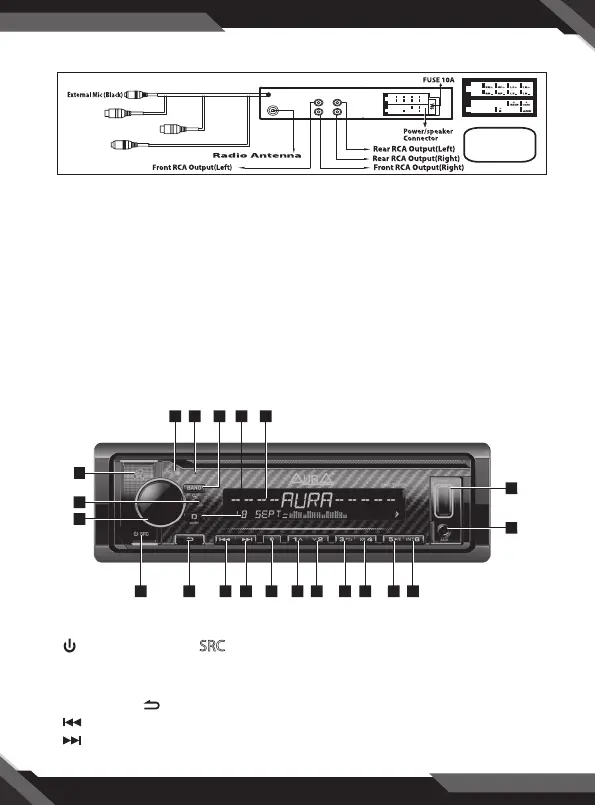
CONTROL PANEL BUTTONS
1. (Power)/Press the SRC(source) button to switch between the button
RADIO, BT(Bluetooth), USB with a USB device inserted, AUX-IN mode(input
assistant)
2. Short press back to the previous conquration point.
3. (tune back, search back, crawl back, fast reverse)
4. (tune forward, search forward, crawl forward, fast forward)
3
HANDS FREE PUSH-TO-TALK
PUSH-TO-TALK
• Allows you to access SIRI or GOOGLE voice via Wireless BT.
• Your phone must support SIRI or GOOGLE voice. Once connected to BT, your phone will ask for
access to your contact list.
• Now you are ready to use PUSH-TO-TALK. Press the PUSH-TO-TALK icon.
You are ready to talk. Call "(CONTACT NAME)" The system will call without
having to use your phone.
WIRING CONNECTIONS
CONTROL PANEL BUTTONS
19
20
21
1 2 10987654 113
1417 16 1518
13
12
WIRING DIAGRAM
PRECAUTION
+12V DC
NEGATIVE
EARTH
AMPLIFIER OUTPUT
SWC
SUBWOOFER(L)
SUBWOOFER(R)



 To Next Page